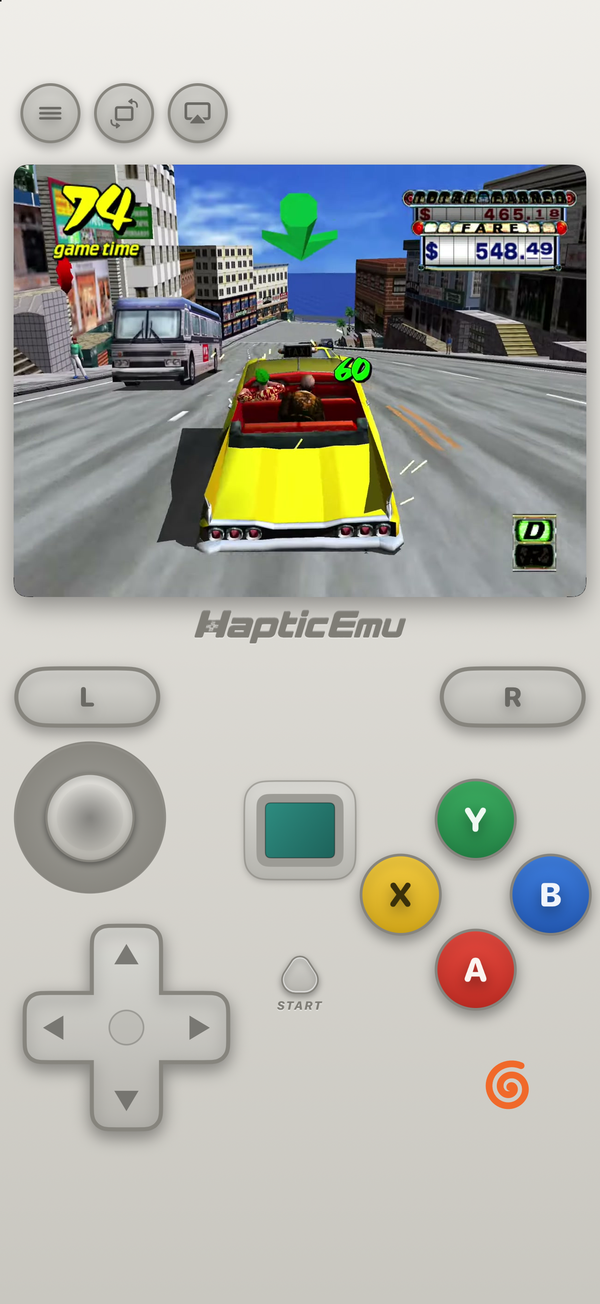
The Dreamcast had a short life as a console, but a long one as something to emulate. On Android it's one of the friendliest systems there is: the open-source emulator most people recommend is a free download from Google Play, it doesn't need a BIOS, and a 1999 console with a 200 MHz processor is well within what an ordinary modern phone can do. So the question for a Dreamcast emulator for Android isn't whether it works. It's which app, which files, and how much you want to set up.
Haptic Emulator plays the Dreamcast on Android too, on Flycast's own core. Here's how the options compare, and what to expect.
What you need
- An Android phone on Android 9 or later, with a 64-bit ARM chip. That's nearly every phone sold since about 2019.
- Haptic Emulator from Google Play. Free, ordinary install: no APK, no "unknown sources".
- A backup of a Dreamcast disc you own, ideally as a single
.chdor.cdifile.
No BIOS, no dc_boot.bin, no flash file.
The file that trips people up: .gdi
A lot of Dreamcast backups are a .gdi file sitting next to a handful of track files. For Haptic on Android, convert that set into a single .chd first: the free chdman tool from the MAME project does it on a computer, and the result is one tidy, smaller file that carries every track. .chd and .cdi files import in one step, a .cue with its tracks works too, and .m3u playlists cover multi-disc games.
Flycast, Redream or Haptic: which Dreamcast emulator for Android?
We make Haptic, so weigh this accordingly. All three are good, and two of them share an engine.
Flycast is the reference. It grew out of the older Reicast project, which is no longer developed, and it's free, open source, and on Google Play as an official app from its developer. Beyond the Dreamcast it plays the NAOMI, NAOMI 2 and Atomiswave arcade boards that SEGA built on the same hardware. It has resolution scaling, per-game settings, widescreen hacks, and experimental online play for a list of games that had it originally. If you want every option there is, or the arcade side, get Flycast.
Redream is a closed-source emulator built only for the Dreamcast, known for being polished and simple. The Android app is free to play at the console's own resolution; a one-time Premium purchase unlocks HD rendering and more save slots. If you only care about the Dreamcast and like an app that stays out of the way, it's worth a look.
Haptic is for people who want the Dreamcast next to everything else they own, with nothing to configure. You import a game, it lands on a Dreamcast shelf with its cover art, you press play, and the on-screen controls are laid out like the Dreamcast pad. Every press answers through the phone's vibration motor. The Dreamcast shares the app with 25 other systems, from the NES and Genesis to the Saturn, PS1, GameCube and 3DS, with one controller setup for all of them.
The honest trade
Haptic's Dreamcast is deliberately simple, and narrower than Flycast's: no online play, no arcade boards, no cheats, and the triggers are on or off rather than pressure-sensitive (more below). If any of those matter, Flycast is the better Dreamcast app today. Haptic's bet is that most people want their games to start without a tutorial, and to live alongside the rest of their collection.
How to play a Dreamcast game in Haptic
- Install Haptic Emulator from Google Play.
- Import your game. Tap import and pick the file, or share it into Haptic from the Files app, a browser download or a cloud drive app. A
.chdor.cdigoes straight to the Dreamcast; for a.cueor some.chdfiles, which other SEGA and Sony discs use too, Haptic reads the disc to work out the console and only asks if it can't tell. - Let it file itself. The game lands on the Dreamcast shelf with its box art.
- Press play. There's no BIOS screen to get through: the game boots straight away.
The free version holds a handful of games in its library; Haptic Pro lifts the limit and adds unlimited save states, fast-forward and batch import.
The JIT, and which phones run it well
The Dreamcast's processor is a Hitachi SH-4, and your phone's is ARM. Flycast bridges the two with a recompiler: it translates blocks of the game's code into ARM instructions once and runs the translation from then on, which is far faster than working out every instruction as it comes. Android allows apps to do this, so on Android Haptic runs Flycast with its recompiler switched on, exactly as Flycast's own app does. (Apple doesn't allow it on iPhone, where Haptic uses a build of Flycast made to run without one.)
The Dreamcast is a much lighter load than the GameCube or 3DS, but it's still a 3D console:
- Mid-range phones of the last few years generally run it comfortably, at the console's own 640×480.
- Budget and older phones can slow down in the busiest scenes. Lighter games, and 2D fighters, fare best.
- Scaling costs GPU time. If a game stutters at 2× or 3×, drop back to 1×.
Phones vary too much for a blanket promise. Haptic is free, so the quickest way to know how a game runs on yours is to try it.
Sharper than the original
The Dreamcast drew at 640×480, which was sharp in 1999 and looks soft on a phone screen. Haptic's in-game menu has a Scaling setting that renders Dreamcast games at 1×, 2× or 3× that resolution, up to 1920×1440, so edges and textures come out crisper. It's part of the free version. Flycast has resolution scaling too; in Redream it's a Premium feature.
The pad, controllers and the TV
The Dreamcast controller put its analog stick above the d-pad, with four coloured face buttons, START in the middle and two triggers on the back. Haptic's skin follows it: the stick where your left thumb rests, the d-pad below it, A, B, X and Y in their original red, blue, yellow and green, and L and R across the top. Turn the phone sideways for a landscape layout, and rearrange anything in the layout editor.
One honest difference: the real triggers were analog, so racing games let you feather the throttle. In Haptic the triggers are all or nothing, pulled fully or released, on screen and on a controller. Most games only use them as buttons, but if you play a lot of racing games, Flycast reads trigger pressure.
PlayStation and Xbox controllers and other Bluetooth or USB gamepads work, with the left stick as the analog stick and the triggers as L and R. Haptic handles up to four controllers, each with its own button mapping. With Haptic Pro you can play on a TV too: connect a USB-C to HDMI cable or cast from Android's Quick Settings, and the phone becomes the controller.
Saves and the VMU
Dreamcast games saved to the VMU, the memory card that plugged into the controller. In Haptic that just works: games find a memory card, save to it and load from it as they did on the console, and like your game files the saves stay on your phone and are never uploaded. Android's Google backup doesn't include Haptic's data, so use the app's own export or backup to keep a copy. Save states are there too, unlimited with Haptic Pro.
What doesn't work
- Online play. Flycast's experimental online servers aren't part of Haptic.
- Arcade boards. NAOMI and Atomiswave games are a Flycast feature; Haptic's Dreamcast is the home console only.
- Analog trigger pressure, as above.
- Cheat codes aren't offered for the Dreamcast, though they are for several older systems.
- The VMU's own screen and mini-games. The memory card saves, but its little display and the games you could carry on it aren't reproduced.
- Accessories beyond the controller: the light gun, keyboard, mouse, fishing rod and microphone.
Is it legal?
Emulators are legal software, and Google Play carries plenty of them, Flycast included. What matters is where the game comes from. Haptic ships no games, no disc images and no BIOS files, and has no way to find them: it plays backups of discs you own. Making that backup is the part you do yourself.
For the curious (optional)
The Dreamcast launched in Japan in 1998 and in the US on 9 September 1999, with a 200 MHz Hitachi SH-4 processor, a PowerVR2 graphics chip from NEC and VideoLogic, and games on GD-ROM, a 1.2 GB disc format of SEGA's own. That disc format is why Dreamcast backups come in odd shapes: a .gdi describes the GD-ROM's separate tracks, a .cdi comes from the CD-R copies of the era, and .chd packs either into one compressed file. On Android, the recompiler handles the SH-4, and the PowerVR's scenes are redrawn by your phone's GPU, which is why Scaling costs graphics time rather than processor time.
Frequently asked questions
What is the best Dreamcast emulator for Android?
Do I need a Dreamcast BIOS on Android?
Which Dreamcast file formats does Haptic accept on Android?
Is Flycast on Google Play?
Does Haptic use JIT for the Dreamcast on Android?
Can I play Dreamcast games in HD on Android?
The Dreamcast, and 25 more.
Haptic Emulator runs 26 retro systems on Android phones — free to play, and it ships no games: it plays the ones you already have.


Free on Google Play · Android 9 and later · 26 systems