Read almost any guide to a PS1 emulator on Android and step one is a chore: get a BIOS file from a PlayStation, put it in the right folder, point the emulator at it. For a lot of people that's where the evening ends.
In Haptic Emulator you can skip that step. Import a PlayStation game you own, press play, and it boots. This post explains how, what the BIOS option is still for, how multi-disc games work, and how the other Android PS1 emulators compare, including DuckStation, whose Android story has had more twists than most of its games.
No BIOS needed: here's why
The BIOS is the PlayStation's own built-in software: the startup screen, the memory card manager, and a set of routines games call while they run. It's Sony's code, so no emulator can ship it, which is why so many emulators ask you to dump a copy from your own console first.
Haptic plays PS1 through two open-source cores and picks between them for you:
- PCSX-ReARMed, by default. It carries its own replacement for the BIOS routines, written by its developers, so games boot without any Sony file. This is what runs when you haven't added anything.
- Beetle PSX, if you add a BIOS. If you dump a BIOS from a PlayStation you own and add it, Haptic switches to Beetle PSX, a more accurate core that needs the real thing.
The built-in replacement handles the large majority of the library. A few games are fussier about it, and that is what the BIOS option is for. Either way, Haptic never supplies a BIOS, and we won't tell you where to find one: the only legitimate copy is the one inside your own console.
Multi-disc games: .cue and .m3u
Plenty of PlayStation's biggest games came on two, three or four discs. Here's how that works on a phone.
- A disc is usually a .cue plus one or more .bin files. The .cue is a small text file describing the disc's tracks. Keep them together; zipping a disc's files into one archive is the easiest way, and Haptic unpacks zip, 7z and RAR for you.
- A .m3u file ties the discs together. It's a plain text playlist listing each disc's .cue file, one per line. With one, the whole game appears once on your shelf instead of three times.
- Swap from inside the game. When disc one ends and the game asks for disc two, change discs from the in-game menu and carry on. Memory card saves carry across.
All four shoulder buttons
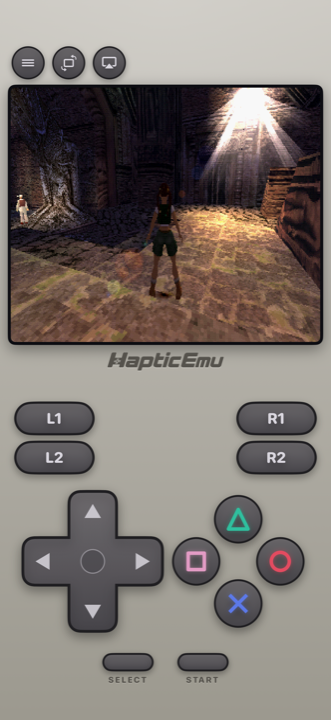
The PlayStation pad introduced L1, L2, R1 and R2, and the library uses all of them, racing games especially. Haptic's PS1 layout puts all four on screen, with the face buttons in their diamond. In portrait you get the console-style pad under the picture; turn the phone sideways for full-screen with floating controls. Everything can be moved in the layout editor, and every press answers through the phone's vibration motor.
For long sessions, a real pad is better still. PlayStation and Xbox controllers and other Bluetooth or USB gamepads connect, with per-player remapping and up to four players for the multiplayer games.
PS1 emulators on Android, side by side
| Haptic Emulator | DuckStation | ePSXe | RetroArch | |
|---|---|---|---|---|
| Systems | 26, PS1 included | PS1 only | PS1 only | Dozens, via cores |
| Price | Free to play with ads; optional Pro | Free | Paid | Free |
| BIOS | Not needed; add your own for the more accurate core | Required, dumped from your console | Recommended; limited built-in fallback | Depends on the core you choose |
| Status, November 2026 | On Google Play | Play Store build; rewritten version in public testing since October 2026 | On Google Play, updated in 2026 | On Google Play |
| Other consoles in the same library | Yes, 25 more | No | No | Yes, one core per system |
| Ships games or BIOS | No | No | No | No |
Competitor details are as of November 2026 and will drift, DuckStation's especially.
DuckStation: brilliant, and in flux
DuckStation is one of the most respected PlayStation emulators on any platform, known for accuracy and for enhancements like upscaling and corrected 3D geometry. On Android its story has been bumpy. In March 2024 its developer said they were done with Android, citing Google's requirement that developers publish their legal name. The Play Store version stayed up but went a long stretch without updates, and in March 2026 the developer said no more Android updates were coming.
Then, in October 2026, a rewritten Android version appeared as public test builds, first distributed outside the Play Store. As of this writing it's a beta, so if DuckStation is your pick, check the developer's own announcements for which version to use. Either way it needs a BIOS dumped from your own console.
ePSXe: the veteran
ePSXe has been on Android for well over a decade and is still maintained: a 2026 update added better CHD support and Google Drive backups for memory cards and save states. It's a paid app. It can run without a BIOS through a built-in fallback, though its own notes describe that support as limited, and a BIOS dump from your console is the recommended setup.
RetroArch and Lemuroid: free and multi-system
RetroArch runs PlayStation through cores you choose, including PCSX-ReARMed and Beetle PSX, the same two Haptic uses. It's free and endlessly configurable, with desktop-style menus that take some learning on a phone. Lemuroid is a free, open-source app with a simpler front end that also plays PS1 through PCSX-ReARMed alongside other systems. Both are good apps. Haptic's case against them is polish rather than capability: per-system controller skins, vibration on every press, box-art shelves and TV play built in.
Haptic: PlayStation as one shelf of many
Put together, Haptic's PS1 pitch is: no BIOS step, multi-disc games that behave, all four shoulder buttons, and the PlayStation sitting next to your Game Boy, N64 and PSP games in one library with box art that downloads on its own. Install from Google Play, pick your games with Android's file picker or share them in from your Files or cloud drive app, and play.
PS1 is free to play. Haptic Pro adds unlimited save states, auto-save, fast-forward, the CRT-style screen filters, batch import, a bigger library and Play on TV, where the game moves to the television over a USB-C to HDMI cable or Android screen casting and the phone becomes the controller.
Your memory card, backed up
Haptic keeps the equivalent of a memory card for each game, and your game files and saves stay on the phone and are never uploaded. Haptic's data is also left out of Android's Google backup, so a new phone won't bring it along by itself. Export your save data from Haptic now and then; that's free on every version.
Which phone do you need?
Almost any. Haptic needs Android 9 or later on a 64-bit ARM phone, which is essentially every phone sold since around 2019, and PS1 is one of the lighter systems to emulate. If your phone can install Haptic, it can play PlayStation games.
For the curious (optional)
The PlayStation ran most games at around 320×240 and had no sub-pixel precision in its 3D, which is why textures swim and polygons wobble as the camera moves. That's authentic behaviour, not the emulator getting it wrong. Artists also used dithering, fine checkerboards of two colours, to fake shades the hardware couldn't show, trusting a tube television to blend them.
A sharp phone screen blends nothing, so the dots and the wobble stand out. Haptic's CRT-style filters (Pro) put back some of the softening those games were drawn for. Emulators like DuckStation take the other route and correct the geometry and raise the resolution. Neither is wrong; they're two ideas of what "looks right" means.
Frequently asked questions
Do I need a BIOS to play PS1 games on Android?
What is the best PS1 emulator for Android?
Is DuckStation still available on Android?
How do I play multi-disc PS1 games on Android?
Will PS1 games run on my Android phone?
Does Haptic Emulator come with PS1 games?
PlayStation on Android, and 25 more.
Haptic Emulator runs 26 retro systems on Android phones — free to play, and it ships no games: it plays the ones you already have.


Free on Google Play · Android 9 and later · 26 systems