Android has always been the easy platform for emulation. Google Play has carried emulators for well over a decade, so the question was never whether your phone can play your old games. It's which of the dozens of apps to trust with them, and the honest answer to "what's the best emulator for Android" depends on two things: what's on your shelf, and how much setting up you're willing to do.
Below: the main options and who each one suits, then the things that are different about emulation on Android, and what actually separates these apps once you've used one for a couple of weeks.
The best emulators for Android at a glance
Two kinds of app come up. All-in-ones play many systems in one place; single-system apps go deep on one console.
| Plays | Price | Best for | |
|---|---|---|---|
| Haptic Emulator | 26 systems: NES to 3DS, GameCube, PS1, PSP, SEGA, Atari, arcade, MS-DOS | Free to play with ads; optional Pro | One app for everything you own, no setup |
| RetroArch | Dozens, via cores you pick and install | Free, open source | Tinkerers, and people who use it on a PC or handheld already |
| Lemuroid | Around 20, from Atari to PSP and DS | Free, open source | A simple free all-in-one, with cloud save sync |
| PPSSPP | PSP only | Free; paid Gold version | Deep PSP settings |
| Dolphin | GameCube and Wii | Free, open source | GameCube with every setting, and Wii |
| Azahar | 3DS only | Free, open source | The standalone 3DS emulator since Citra ended |
| melonDS | DS only | Free, open source | Deep DS settings |
| M64Plus FZ | N64 only | Free with ads; paid Pro | N64 plugin and graphics tinkering |
Details come from each app's Google Play listing and project pages in November 2026, and they will drift. None of them ships games.
Picking by what's on your shelf:
- Several consoles, and you'd rather play than configure: Haptic. Everything on one set of shelves, with controls built for each system.
- Several consoles, and you enjoy settings menus: RetroArch. Lemuroid if you want something free and simpler.
- NES: every app here plays it, plus NES-only apps like NES.emu and NostalgiaNes. See NES emulators for Android.
- SNES: every app here plays it too. Snes9x EX+ is the free SNES-only app, and SUPER ZSNES is a new paid one from the ZSNES team. See SNES emulators for Android.
- Game Boy Advance: nearly everything here plays it well, plus GBA-only apps like LinkBoy, My Boy! and Pizza Boy A. See GBA emulators for Android, or the best GBA emulator for Android for all of them side by side.
- PSP only: PPSSPP. See PSP on Android.
- DS: melonDS. DraStic, the old favourite, was pulled from Google Play in February 2025. See DS on Android and the best DS emulators for Android.
- 3DS: Azahar, the community successor to Citra, which shut down in March 2024. See 3DS on Android.
- GameCube: Dolphin, which also plays Wii. See GameCube on Android, or every GameCube option compared.
- Dreamcast: Flycast, which also plays SEGA's NAOMI arcade games. See Dreamcast on Android.
- PS1 only: DuckStation is the name enthusiasts give, but its Android version has had an on-off couple of years, with a rewritten app in testing this autumn, so check its current state before you rely on it. See PS1 on Android.
All-in-one, or one app per console?
This is the first real fork, and it matters more than anything technical.
Something worth knowing: most of these apps share their engines. The emulation inside RetroArch, Lemuroid and Haptic comes from the same family of open-source "cores", many of them versions of the very projects in the table. Haptic's PSP is PPSSPP's core, its GameCube is Dolphin's, its 3DS is Azahar's, its DS is melonDS. So accuracy isn't what separates the all-in-ones. The shell around the core is.
RetroArch is the most capable shell there is. Every system works the same way, every setting is exposed, and the same setup carries across your phone, PC and handheld. The cost is setup: you choose and install a core for each system, the menus are desktop-style, and the touch controls are generic until you configure them. The Google Play version offers a curated selection of cores rather than everything the project builds.
Lemuroid wraps similar cores in a much friendlier app. It scans your games, has touch controls you can resize and move, supports gamepads, and syncs saves to the cloud. It's free and open source, and it's a genuinely good first emulator.
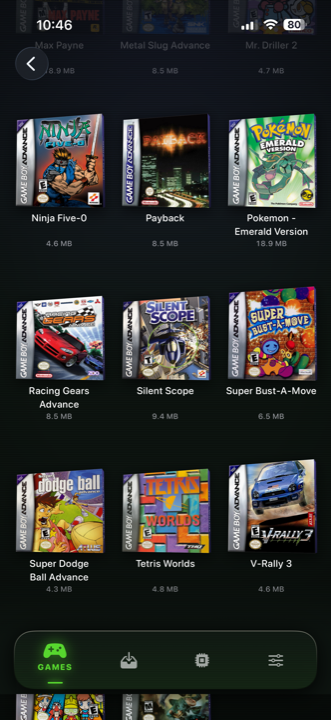
Haptic is built for people who want the whole collection in one place with nothing to configure, and who care how it feels. Each console gets its own layout and skin. Every press answers with a buzz from the phone's vibration motor, and in-game rumble (an N64 Rumble Pak game, say) comes through too. Games land on 3D box shelves per console with the cover art downloaded for you. And it reaches further up the timeline than Lemuroid: GameCube, 3DS, Saturn and Dreamcast are all on the list of 26.
Dedicated apps still have a place. If you only play PSP and want to tune every graphics option, PPSSPP itself has more knobs than any all-in-one exposes.
What's different on Android
Android lets emulators use JIT
The demanding emulators translate a console's code into your phone's own code as they go, a technique called JIT recompilation. Android allows apps to do this. iPhone doesn't, so iPhone emulators fall back to slower interpreters for the heaviest systems. On Android, Haptic runs its 3DS and GameCube emulation with their JIT recompilers switched on, the same way Azahar and Dolphin do on their own. It's a large part of why those two systems are more practical on Android.
Your phone matters more than on iPhone
Android runs on everything from budget phones to gaming flagships, so "will it run?" has a real answer:
- Almost any phone: NES, SNES, Game Boy, GBA, SEGA's 8- and 16-bit consoles, Atari, DS and PS1.
- Mid-range and up: PSP and N64, with a handful of heavier games that want more.
- Recent mid-range or flagship: GameCube and 3DS. These lean on the GPU, so what counts is how new the chip is, whether it says Snapdragon, Dimensity, Tensor or Exynos on the box. Haptic's 3DS renders through Vulkan or OpenGL ES 3.2.
Getting your files in
Modern Android keeps apps out of each other's folders, so emulators ask you to pick files or folders through the system picker. In Haptic you tap import and pick, or you share a file into Haptic straight from another app: the Files app, a browser download, or a cloud drive app. Zip, 7z and RAR archives are unpacked for you, and multi-disc PS1 games are handled.
Controllers and the TV
PlayStation and Xbox controllers and other Bluetooth or USB gamepads all work, for up to four players with per-player remapping. With Haptic Pro, Play on TV moves the game to a television, by USB-C to HDMI cable or by casting from Android's Quick Settings, and the phone becomes the controller.
Questions that separate them day to day
Do the controls fit each console?
The N64's yellow buttons are buttons, not a thumbstick. PlayStation games need four shoulder buttons. DS games need a touchable lower screen. A Game Boy screen is nearly square. An app that draws one gamepad for everything gets these wrong; look for one that changes its layout with the game and lets you drag buttons where your hands want them.
Can you get your saves out?
Worth checking before you sink fifty hours into an RPG. Haptic lets you export your saves on the free version. Its app data is excluded from Android's Google backup, so use Haptic's own backup or export to keep a copy. Your game files and saves are never uploaded. If you'd rather have automatic cloud sync, Lemuroid has it and Haptic doesn't.
Does it look right?
Old games were drawn for old screens. Shown perfectly sharp on a modern phone they can look flatter and harsher than you remember. Screen filters put the tube television, the scanlines or the handheld LCD back. In Haptic they're part of Pro.
What Haptic doesn't do
- No Wii, PS2 or Switch. Dolphin plays Wii; Haptic's GameCube refuses Wii discs.
- No original Xbox. That's a separate free app from us, HapticX. Xbox emulators for Android compares it with the others.
- No cloud sync. Saves stay on your phone unless you export them.
- Some formats aren't in yet. GameCube plays .rvz, .gcz, .gcm and .ciso, not .iso yet. 3DS plays decrypted games, not .cia files.
- The free version has ads and a small library. It holds a handful of games; Pro removes the limit.
- Save states are a Pro feature. Unlimited save states with Haptic Pro; free players can earn one by watching an ad, and loading a state is always free.
The honest limits of all of them
- No games included. Any app shipping games or pointing you at them is taking a risk you'd end up sharing.
- Motion, microphone and camera games are awkward. Some apps map tilt to the phone's sensors; none can make a phone into a 3DS.
- 3D games use battery and get warm. A GameCube session costs noticeably more than a Game Boy one.
So, short answer
One console and a love of settings menus? Get the dedicated app for it, or RetroArch. Want something free and simple? Lemuroid.
Want the whole collection in one place, with controls that suit each console, a buzz under every press, and saves you can take with you? That's what Haptic is built for.
For the curious (optional)
Core — the emulation engine for one console, packaged so a front-end app can load it. RetroArch, Lemuroid and Haptic all use open-source cores.
JIT (just-in-time recompilation) — translating a console's code into your phone's code on the fly, instead of interpreting it instruction by instruction. Android allows it; iOS doesn't.
BIOS — a console's built-in startup software. Most systems in Haptic need none; PS1 plays without one and switches to a more accurate core if you add your own dump.
Save state — a snapshot of the exact moment you're at, which the original consoles couldn't do. Different from the game's own save.
Frequently asked questions
What is the best emulator for Android?
Is RetroArch or Lemuroid better than Haptic Emulator?
Do I need to sideload an APK to use an emulator on Android?
Will my Android phone be fast enough?
Do Android emulators come with games or BIOS files?
Is Haptic Emulator free on Android?
Your whole childhood. One download.
Haptic Emulator runs 26 retro systems on Android phones, tablets and foldables — free to play, and it ships no games: it plays the ones you already have.


Free on Google Play · Android 9 and later · 26 systems