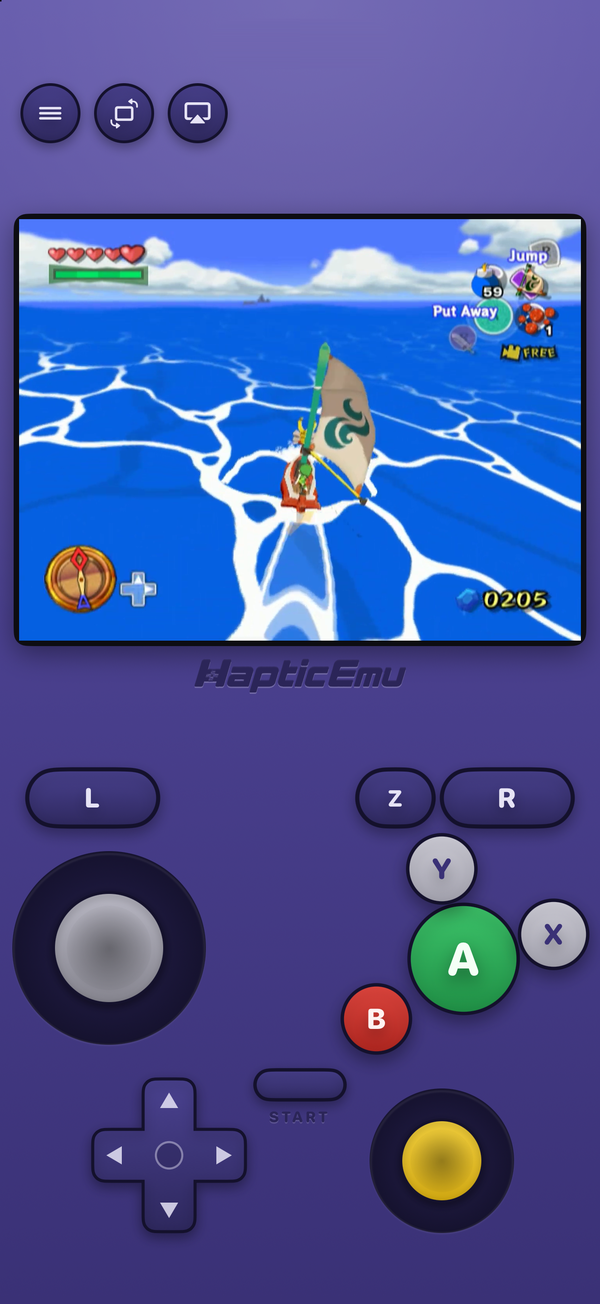
When Apple opened the App Store to emulators in April 2024, the GameCube was the console everyone assumed would be left out. The well-known GameCube emulator, Dolphin, leans on JIT to be fast, App Store apps aren't allowed to use JIT, and so the answer to "can I play GameCube on my iPhone?" stayed "only if you sideload."
That's no longer the whole answer. In October 2026 Haptic Emulator added the GameCube as its 26th system, running on an engine built to work without JIT. Here's what that involves, including the parts that aren't perfect yet.
What you need
- An iPhone on iOS 18 or later. That's an iPhone XS or newer, though for GameCube a recent phone matters more than the minimum — more on that below.
- Haptic Emulator 1.0.14 or later from the App Store. Free, ordinary install.
- A backup of a GameCube game you own, as an
.rvz,.gczor.gcmfile.
That's the whole list. No BIOS, no IPL dump, no JIT tool, no computer that has to stay paired with the phone.
The one catch: .iso
Many GameCube backups are .iso files, and Haptic doesn't recognise those as GameCube yet. PlayStation, PSP, Saturn and DOS games use .iso too, and the app can't yet tell a GameCube disc apart from the extension alone. The fix takes a minute: open the game in Dolphin on a Mac or PC and convert it to .rvz. It's lossless, and the file usually gets much smaller, which your iPhone's storage will thank you for. Our RVZ guide walks through it.
Getting started: the one-minute part
- Get Haptic Emulator from the App Store. Nothing to configure first.
- Tap import and pick the
.rvzfrom Files, a folder, or the clipboard. Import the game file itself; a.zipwith a GameCube game inside is turned away. - Let it file itself. The game lands on a GameCube shelf with its cover art.
- Press play. The GameCube pad loads: control stick, C-stick, A, B, X, Y, Z, the L and R triggers, START and the small cross.
The GameCube pad, on glass
The GameCube controller was an odd shape, and its games were built around it, so Haptic doesn't use a generic gamepad. The control stick takes the left thumb's place, because GameCube games steer even their menus with it, with the small d-pad tucked below. On the right sits the big A button with B, X and Y around it the way the real pad had them, the C-stick, and Z inboard of R.
Every press answers through the Taptic Engine. Turn the phone sideways and there's a landscape layout too, with the controls along the sides of a 4:3 picture.
How well it runs
This is the honest section. The GameCube's processor is a PowerPC chip, and emulating it is the expensive part. On a computer, Dolphin uses a JIT to translate that code once and reuse it. An App Store app can't, so Haptic runs it on Dolphin's Cached Interpreter, which avoids the JIT's tricks entirely. That's why there is nothing to set up and nothing that breaks with an iOS update. It also means the iPhone works harder.
In practice:
- GameCube is one of the most demanding systems in the app. It is a sixth-generation console with a real 3D graphics chip, and reproducing it in software is a lot of work.
- Newer iPhones run it best, by a wider margin than for any other system. Lighter games fare better than the heaviest 3D ones, and the busiest scenes are where an older phone will show its age.
- The first time an effect appears, it may be missing for a frame or two while the phone prepares it, instead of the whole game stopping to wait. The second time it's instant, because it's kept.
We'd rather tell you that than promise full speed everywhere. The quickest way to know how a particular game runs on your phone is to try it: Haptic is free, so trying costs nothing.
Controllers
PlayStation, Xbox and MFi controllers connect over Bluetooth and map the way you'd expect: the left stick is the control stick, the right stick is the C-stick, the triggers are L and R, and the right bumper is Z. A controller with proper triggers is the nicest way to play anything that leans on the shoulder buttons.
What doesn't work
- Wii games. Haptic is GameCube-only.
.wbfsand.wiafiles are turned away at import, and Wii games aren't supported in any format,.rvzincluded. - Plain
.isofiles, for now. Convert them to.rvzfirst. - Upscaling. GameCube games render at the console's own resolution; there's no higher-resolution option for GameCube yet.
- Cheat codes aren't offered for GameCube yet, though they are for older systems.
- Game Boy Advance link features, the ones that needed a GBA plugged into the GameCube with a cable.
Saving works as you'd hope: in-game saves stay on your phone, and save states are there too, unlimited with Pro.
Is it legal?
Emulators are legal, and Apple allows them on the App Store under guideline 4.7. What matters is where the game comes from. Haptic ships no games, no disc images and no BIOS files, and has no way to find them: it plays backups of discs you own. Making that backup from your own disc is the part you do yourself.
For the curious (optional)
The GameCube launched in 2001 with a 485 MHz IBM PowerPC processor called Gekko, an ATI graphics chip called Flipper, and games on 1.5 GB mini discs. It drew at 640×480. Dolphin, the open-source emulator, has been reproducing it since 2003 and is the foundation of nearly every GameCube emulator you'll find, on any platform, including this one.
Why does the JIT matter so much? A JIT reads a block of the game's PowerPC code once, translates it into the phone's own ARM instructions, and runs the translation every time after. An interpreter has to work out each instruction as it meets it. Dolphin's Cached Interpreter sits between the two: it caches the work of decoding, but still doesn't produce native code. That gap is why GameCube on the App Store asks for a newer iPhone, and why the newest ones make the biggest difference here.
Frequently asked questions
Is there a GameCube emulator for iPhone?
Do I need JIT, a jailbreak or sideloading?
Which GameCube files does Haptic Emulator play?
Do I need a GameCube BIOS or system files?
Does Haptic play Wii games?
Will GameCube games run at full speed?
Can I use a controller for GameCube games?
Does Haptic Emulator come with GameCube games?
The GameCube, and 25 more.
Haptic Emulator runs 26 retro systems on iPhone and iPad — free to play, and it ships no games: it plays the ones you already have.

Free to play · all 26 systems · iPhone & iPad