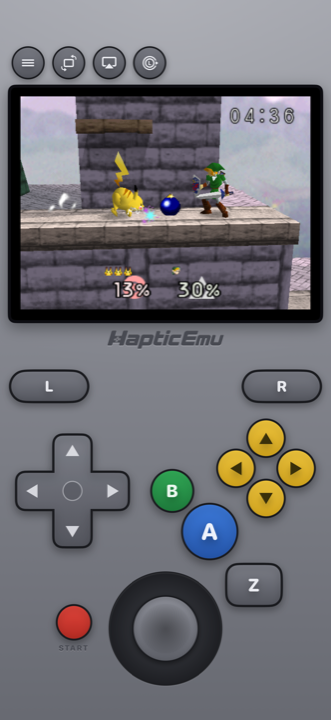
The Nintendo 64 is the console a lot of people remember most fondly and have the least access to. The cartridges are expensive now, the console needs an old television or an adapter, and the games mostly haven't been re-released.
Meanwhile the phone in your pocket runs them comfortably.
The controller problem, solved
Here's the thing that makes or breaks N64 on a phone. That controller was genuinely strange — three grips, a stick nobody had seen before, a trigger underneath, and four little yellow C-buttons.
Most emulators squash the C-buttons into a second thumbstick and hope for the best. That falls apart the moment a game uses them as actual buttons, which is constantly — they're your weapons in the shooters, your camera in the platformers, your menu in the RPGs.
Haptic lays them out as four real yellow buttons where they always were, next to the stick and the Z trigger. Everything can be dragged somewhere else if your hands disagree, and you can tune how sensitive the stick is per game — worth thirty seconds in any 3D platformer.
- A stick you can actually place. Size it, move it, set how far it has to travel.
- Real controllers work too. PlayStation, Xbox and MFi pads all connect.
- Two players. Pair two controllers for local multiplayer — this was a four-controller console, after all.
- Put it on the TV. Send the picture to a television and it starts to feel like the real thing again.
Getting started: the 30-second part
Already have the ROM on your phone? Then you're nearly there.
- Download Haptic Emulator from the App Store. Normal install, free, nothing expires.
- Tap import. From Files, a folder, or the clipboard. Zipped files are fine as they are.
- Let the box art land. Cover art downloads automatically and the game files itself on your Nintendo 64 shelf.
- Press start. The N64 controls load on their own.
Save states change the hard ones
A lot of N64 games came from an era with limited saving and no mercy. Being able to snapshot the game before a difficult section — and drop straight back in when it goes wrong — makes a good number of them genuinely enjoyable rather than an exercise in patience.
Getting it looking right
One tip specific to this console: don't go for maximum sharpness.
The N64 was a deliberately soft-looking machine, and its games were made for televisions that softened them further. Displayed completely clean and razor-sharp, you sometimes end up seeing the joins the original blur was politely hiding. A light old-television filter usually looks more like the console you remember than no filter at all.
Try it both ways on something familiar and trust your eyes — it's a two-tap change either direction.
Worth knowing
Multiplayer over a cable or a link-up between machines isn't something a single phone can recreate. Local two-player with two controllers on one device works fine, and that covers most of what people actually want.
For the curious (optional)
Skip this if you just want to play. It's the why, for anyone interested.
The Nintendo 64 leaned hard on smoothing its graphics — it blurred textures on purpose, ran an anti-aliasing pass over the picture, and then sent the result to a CRT television that softened it again. Its textures were also extremely low resolution, because cartridges left very little room for them. Artists worked knowing all of this would happen.
That's why rendering an N64 game with modern sharpness can look subtly wrong: you're removing three layers of intentional softening and exposing texture seams that were never meant to be visible. It's the opposite of the advice for a 2D console like the SNES, where you generally do want the pixels crisp.
Frequently asked questions
How do the N64 C-buttons work on a touchscreen?
Do I need to jailbreak my iPhone?
Can two people play on one device?
Does Haptic Emulator come with games?
Should I use a screen filter for N64 games?
Your whole childhood. One download.
Haptic Emulator runs 21 retro systems on iPhone and iPad — free to play, and it ships no games: it plays the ones you already have.

Free to play · all 21 systems · iPhone & iPad