If you've looked into emulators on iPhone at all, you've heard of Delta. It was first through the door when Apple changed its rules in April 2024, it went to number one on the App Store, and it's been the default recommendation since. Deservedly: it's a good app.
So this isn't going to be a hit piece. Delta and Haptic are built around different ideas of what an emulator on a phone is for, and the fair thing is to lay both ideas out and let you pick the one that matches your shelf of games.
The short version
- Every game you own is Nintendo, and you play on more than one device? Delta. Seven Nintendo systems, done well, with your saves synced through Google Drive or Dropbox.
- You own anything from Sony, SEGA, Atari or the arcade, or you'd rather nothing left your phone? Haptic. The same Nintendo systems plus 17 more, on one shelf, free to play.
Side by side
| Delta | Haptic Emulator | |
|---|---|---|
| Systems | 7: NES, SNES, N64, GB, GBC, GBA, DS | 24: those seven plus PS1, PSP, Genesis, Master System, Game Gear, SG-1000, Saturn, Dreamcast, five Atari systems, TurboGrafx-16, Neo Geo, Arcade (MAME), MS-DOS |
| Price | Free; optional patron tiers | Free to play; optional Pro (weekly, yearly or lifetime) |
| Controls | Per-system skins, downloadable | Per-system layouts incl. N64 C-buttons, PS1 four shoulders, DS stylus, DOS keyboard; drag any button |
| Haptic feedback | Yes | Yes, Taptic Engine on every press |
| Library | Grid with cover art | 3D box-art shelves per system, art fetched automatically |
| Real controllers | PlayStation, Xbox, Switch, NSO, MFi, keyboards | PlayStation, Xbox, MFi |
| Local two-player | Yes | Yes |
| Saves | Cloud sync via Google Drive or Dropbox | Local; export free; library backup (Pro) |
| Save states | Yes | Yes; unlimited slots with Pro |
| Fast-forward | Yes | Yes (Pro) |
| Cheats | Yes | Yes |
| Screen filters | Limited | CRT, VHS, handheld LCD and more (Pro) |
| Play on a TV | Standard iOS mirroring | Built in (Pro), phone as controller |
| Data leaves the phone | If you enable sync | Never; no account, no upload |
| Minimum iOS | iOS 14 | iOS 18 |
| Ships games or BIOS | No | No |
Delta's details come from its App Store listing in October 2026 and will drift. The shape of the comparison won't.
Where Delta is better
Sync. This is Delta's real feature. Turn on Delta Sync, connect Google Drive or Dropbox, and your games, saves, save states, cheats and controller layouts follow you between an iPhone and an iPad. If you play the same RPG on both, that's worth a great deal, and Haptic doesn't do it.
Controller range. Delta pairs with Nintendo's own Switch and Switch Online controllers, including the wireless N64 pad, as well as PlayStation, Xbox and MFi. If you own a Switch Online N64 controller, Delta is the app that makes it feel at home.
Older phones. Delta runs on iOS 14. Haptic needs iOS 18, which means an iPhone XS or newer.
Maturity. Delta descends from GBA4iOS, which people were using a decade ago. It has had a long time to get the small things right.
Where Haptic is better
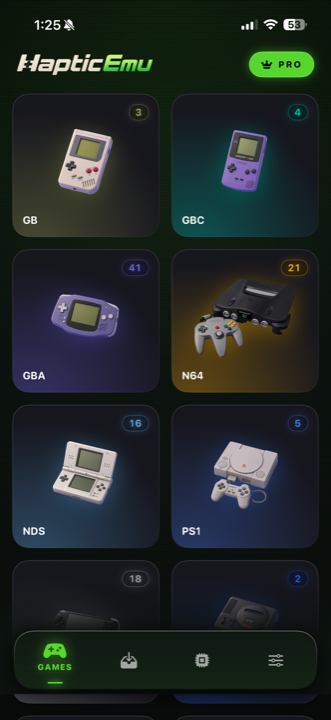
Everything that isn't Nintendo. This is the whole argument. Delta stops at the DS. If you own a PlayStation disc, a PSP game, a Mega Drive or Saturn cartridge, a Neo Geo title or an arcade board, Delta hands you off to a second app with its own interface and its own saves. Haptic puts all of it on one shelf. Seventeen more systems, including the ones with the hardest controller problems: four PS1 shoulder buttons, a DS stylus, a DOS keyboard and trackpad.
Nothing leaves the phone. No account, no cloud, no upload. Your games and saves stay where you put them, and the privacy policy is short enough to actually read. For some people that's a limitation; for others it's the reason to pick it.
The shelf. Haptic's library is 3D boxes on shelves, one shelf per system, with cover art that arrives on its own when you import. It's the part you look at most, and it's the part that makes a collection feel like a collection rather than a file list.
Play on the TV. Send the picture to a television and keep the phone in your hands as the controller. It's part of Pro, and it's the feature that turns N64 and PSP games into something you'd play on the sofa.
Filters. CRT, VHS, handheld LCD, with a range from subtle scanlines to full curved glass. Old games were drawn for old screens, and the right filter is often the difference between "an old game" and "the game I remember".
On the Nintendo systems themselves
For the seven systems both apps play, they're close. Both draw proper N64 C-buttons, both do DS with a stylus, both run everything at full speed, both take real controllers. You won't pick between them on how well they play Super Mario World. You'll pick on sync, on privacy, and on what else is on your shelf.
What they have in common
- Both are normal App Store apps. No jailbreak, no sideloading, nothing that expires.
- Both are free to play. Delta accepts optional patron tiers; Haptic sells an optional Pro upgrade. Neither puts the actual emulation behind a paywall.
- Neither ships games. You bring backups of games you own. That's the only version of this that's legitimate, and both apps are built that way.
- Neither can do a link cable. Trading between two phones needs two machines. One phone can't be two.
So, which one
Count your shelf. If everything on it has a Nintendo logo and you'd like your saves to follow you to an iPad, Delta is a very good app and you should enjoy it.
If anything on that shelf is PlayStation, PSP, SEGA, Atari, Neo Geo or arcade, or if you'd simply rather your games never touched a cloud, Haptic plays all of it in one place, free, and it's a tap away.
For the curious (optional)
Why does Delta stop at Nintendo? Partly history: it grew out of a GBA emulator and added Nintendo systems one at a time. Partly design: each system in Delta gets its own carefully built skin system, and that's slower to extend than a generic approach. A SEGA Genesis core has been in Delta's patron beta for a while, so the line may move.
Why does Haptic need iOS 18? Because it was built recently on current frameworks rather than carrying a decade of older code. The cost is older phones; the benefit is that 24 systems, including 3D ones like PSP and Dreamcast, share one modern rendering path.
Frequently asked questions
What systems does Delta support?
What systems does Haptic Emulator support?
Is Haptic Emulator free like Delta?
Can I use both?
Does either app come with games?
Everything Delta plays. And 17 more.
Haptic Emulator runs 24 retro systems on iPhone and iPad — free to play, and it ships no games: it plays the ones you already have.

Free to play · all 24 systems · iPhone & iPad