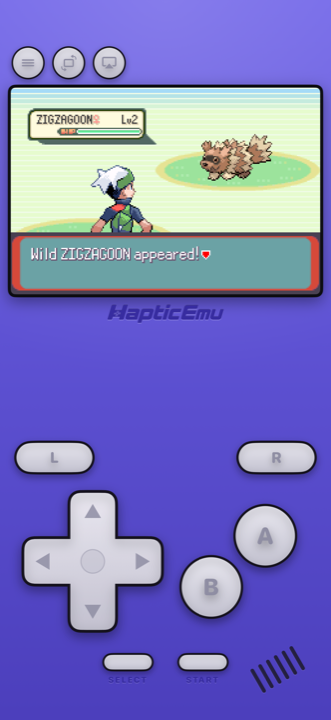
For a lot of people Emerald is the one. Hoenn, the Battle Frontier, the version that took Ruby and Sapphire and made them better. If you played it in 2005 you probably put a hundred hours into it without noticing.
And then it just… stopped being available. Nintendo has never re-released Emerald — not on the Switch, not on the 3DS, not anywhere. Twenty years on, the easiest way to play it is the phone in your hand.
Why not just dig out the cartridge?
You can, and if it still works there's nothing wrong with that. But there's a catch specific to Emerald that catches a lot of people out.
Emerald cartridges have a tiny battery inside, and unlike earlier Pokémon games it doesn't just handle saving — it runs the game's clock. That clock is what makes berries grow and time-based events happen. These cartridges are around twenty years old now, and a great many of those batteries are flat.
A dead battery won't wipe your save, but the game stops keeping time. On a phone that problem simply doesn't exist, because your phone has a clock and always will. It's a slightly odd thing to say, but emulation is the option where Emerald's time-based content actually still works.
What it's like on a phone
The screen is bigger and brighter than a Game Boy Advance ever was — no more tilting it toward the nearest lamp. Hoenn's sprite work genuinely benefits from that.
Haptic gives the Game Boy Advance its own control layout rather than one generic gamepad stretched across every system, so the D-pad, A and B, and the L and R shoulders all sit where your thumbs go looking for them. And each press taps back through the iPhone's Taptic Engine, which sounds like a small thing until you've played without it.
- It's in your pocket. Emerald was made for playing in gaps — on a bus, in a waiting room. That hasn't changed, but now you're not carrying a second device.
- Save anywhere. Which matters enormously in the Battle Frontier. More below.
- iPad works too. Same app, more screen.
- Or push it to the TV. Send the picture to a television and keep the phone as your controller.
Getting started: the 30-second part
Already have the ROM on your phone? Then you're most of the way there.
- Download Haptic Emulator from the App Store. Ordinary install, free, and nothing expires after a week.
- Tap import. Grab it from Files, a folder, or the clipboard. Zipped files work as they are.
- Let the box art land. The cover art downloads on its own and Emerald appears on your Game Boy Advance shelf as a proper boxed game.
- Press start. The Game Boy Advance controls come up automatically.
The Battle Frontier gets a lot friendlier
Emerald's in-game save works exactly as it always did. But you can also snapshot the game at any moment and drop straight back in — which, in the Battle Frontier, is the difference between a fun challenge and losing a streak at match 48 and quietly closing the game forever. Use the game's own save for your real progress and snapshots for the brutal bits.
Two settings worth changing
Turn on the handheld screen filter
Emerald was drawn for a small, dim Game Boy Advance screen. The filter puts that panel's texture back, and the art immediately looks more like you remember it instead of like an old game stretched large. There are CRT and scanline options too if you want a more dramatic old-television look.
Put the buttons where you want them
You're going to be holding this for a long time. Every on-screen button can be dragged somewhere more comfortable, and if you'd rather use a proper controller, PlayStation, Xbox and MFi pads all connect.
What about Omega Ruby?
Reasonable question, since Hoenn did get remade. Omega Ruby and Alpha Sapphire came out on the 3DS in 2014, and they're good games — but they're remakes of Ruby and Sapphire, not of Emerald. The Battle Frontier that a lot of people consider the best part of Emerald isn't in them.
They're also on the 3DS, whose store has closed, so that's a hunt for a physical cartridge and a console to play it on. If it's specifically Emerald you're missing, the original is the only thing that scratches it.
One thing to know upfront
Trading doesn't work. A few Pokémon only evolve when traded to another player, and completing the Hoenn Pokédex needs trades with the other versions — both of which needed two consoles and a link cable, which a single phone can't recreate.
Chasing a complete Pokédex? That's a genuine limit. Replaying Emerald, Battle Frontier and all? It won't come up.
For the curious (optional)
Not required reading — just the why, if you like that sort of thing.
The Game Boy Advance ran at 240×160 pixels on an unlit screen, so artists drew for a dim panel with visible pixel structure, knowing the hardware would soften things. Modern phone screens are far sharper and brighter, which can make that art look harsher than it was ever meant to. The handheld filter adds that texture back, which is why the picture often looks more faithful with it on than off.
Performance isn't a consideration here either. A modern iPhone runs Game Boy Advance games many times faster than the original hardware managed, so nothing about Emerald is demanding — anything you might adjust is about how it looks, not whether it runs.
Frequently asked questions
Has Pokémon Emerald been re-released on a modern console?
Does Haptic Emulator come with Pokémon Emerald?
Why do old Pokémon Emerald cartridges stop working properly?
Do I need to jailbreak my iPhone?
Can I complete the Pokédex?
Can I play it on a TV?
Your whole childhood. One download.
Haptic Emulator runs 21 retro systems on iPhone and iPad — free to play, and it ships no games: it plays the ones you already have.

Free to play · all 21 systems · iPhone & iPad