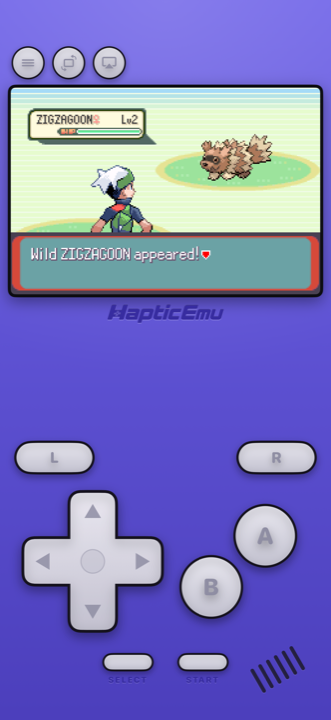
You remember Kanto. The starter you picked and never regretted. The rival who kept turning up. The bit where you finally beat Brock and felt like you'd achieved something enormous.
Pokémon FireRed came out in 2004 for the Game Boy Advance, and Nintendo has never put it on a modern console. So if you want to play it again, the answer is your phone — which, it turns out, is a genuinely lovely way to play it.
What it's like on a phone
Better than you're expecting, honestly.
The screen is bigger and brighter than the Game Boy Advance ever was — the original famously had no backlight, and you spent half your childhood angling it toward a lamp. FireRed's sprite work looks great on a modern display.
The controls sit where your thumbs expect them, because Haptic gives the Game Boy Advance its own layout rather than one generic gamepad stretched over every system — D-pad on the left, A and B on the right, L and R along the top. And every press taps back through the iPhone's Taptic Engine, so you're not just poking silent glass.
- It's always with you. The whole point of a Game Boy was playing in the gaps. Your phone is the same thing, except it's already in your pocket.
- You can save anywhere. More on this below — it changes long RPGs completely.
- It works on iPad too. Same app, bigger screen.
- Or put it on the TV. Send the picture to a television and use the phone as the controller.
Getting started: the 30-second part
Already have the ROM on your phone? Then this is genuinely quick.
- Get Haptic Emulator from the App Store. It's a normal download — no jailbreak, no sideloading, nothing that expires after a week. It's free.
- Tap import. Point it at your ROM from the Files app, a folder, or the clipboard. Zipped files are fine as they are.
- Watch the box art show up. The cover downloads by itself and FireRed gets filed on your Game Boy Advance shelf, looking like a real boxed game rather than a filename.
- Press start. That's it. The Game Boy Advance controls load automatically.
If you've got a stack of games rather than one, you can bring a whole folder over at once instead of doing them one at a time.
Save anywhere you like
FireRed has its own in-game save, and that still works exactly as it always did. But you can also snapshot the game at any moment and jump straight back to it — useful before a gym leader, or when you've spent ten minutes hunting one Pokémon and don't fancy doing it twice. It's the single biggest quality-of-life difference from playing on the original hardware.
Making it feel right
Two things worth thirty seconds when you first load it up.
Turn on the handheld screen filter
FireRed's art was drawn for a small Game Boy Advance screen, and the filter puts back the subtle texture that screen had. It's the difference between "an old game blown up" and "the game as you remember it." There are more dramatic options too — old CRT television, scanlines — if you want to go further.
Move the buttons wherever you want
A Pokémon playthrough is a lot of hours, and everyone's hands are different. You can drag any on-screen button somewhere more comfortable. If you'd rather use a real controller, PlayStation, Xbox and MFi controllers all connect.
FireRed or LeafGreen?
They're the same game with a handful of different Pokémon in each, exactly like Red and Blue were. Pick whichever you had, or whichever sounds better — you won't miss anything meaningful either way.
Both are big improvements on the 1996 originals: proper colour, much nicer sprites, a far less painful interface, and the Sevii Islands afterward, which didn't exist in Red or Blue at all. If you want to replay Kanto, this is the version to do it in.
One thing to know upfront
A few Pokémon — Kadabra, Machoke, Graveler, Haunter — only evolve when you trade them to another player. That needed two Game Boys and a link cable, and it isn't something a phone can recreate.
If you're chasing a complete Pokédex, that's a real limit and it's worth knowing now. If you're here to play through the story again, it won't affect you at all.
For the curious (optional)
Everything above is all you need. This bit is for anyone who likes knowing why things look the way they do.
The Game Boy Advance screen was 240×160 pixels, and unlit — artists drew for a dim, slightly washed-out panel with visible pixel structure. Modern phone displays are much sharper and brighter, so showing those games completely raw can make the art look flatter and harsher than intended. The handheld filter reintroduces that panel texture, which is why it tends to look more "correct" even though it's technically adding something.
The Game Boy Advance is also easy work for a modern iPhone, which runs it many times faster than the original hardware — so there's no performance question here at all. Anything you notice is about presentation, not speed.
Frequently asked questions
Do I need to jailbreak my iPhone to play Pokémon FireRed?
Does Haptic Emulator come with Pokémon FireRed?
Is Pokémon FireRed available on Nintendo Switch?
Can I evolve Kadabra, Machoke, Graveler and Haunter?
Can I use a real controller?
Should I play FireRed or LeafGreen?
Your whole childhood. One download.
Haptic Emulator runs 21 retro systems on iPhone and iPad — free to play, and it ships no games: it plays the ones you already have.

Free to play · all 21 systems · iPhone & iPad