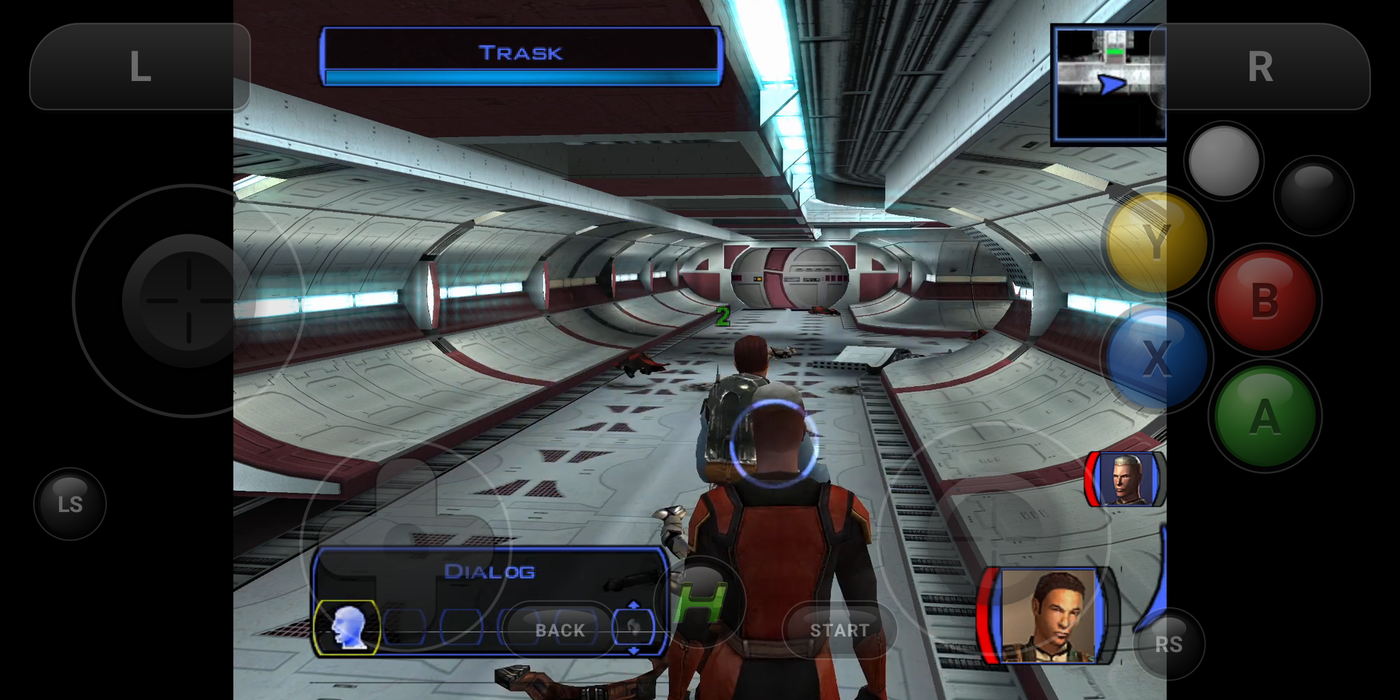
Search for an Xbox emulator for Android and you get a mix of YouTube tests, forum threads and download sites, most of them talking past each other. That's because "Xbox" covers three consoles. The original Xbox from 2001 is playable on a good Android phone today. The Xbox 360 from 2005 is an early experiment. The Xbox One and Series X|S can't be emulated on a phone at all.
A note before the list: we make HapticX, one of the apps below, as well as Haptic Emulator for older consoles. Where another app suits you better, we say so.
The short version
- Original Xbox games (Halo 2, Fable, KOTOR, Forza, Ninja Gaiden)? HapticX, free on Google Play.
- Want the open-source core straight from its developer? hakuX, from its GitHub releases.
- Prefer something based on the PC emulator xemu? X1 Box, a paid app on Google Play.
- Xbox 360 games? Only experimental options so far. See the 360 section.
- Xbox One or Series X games? No emulator exists. Stream them instead.
Side by side
| HapticX | hakuX | X1 Box | aX360e | |
|---|---|---|---|---|
| Console | Original Xbox | Original Xbox | Original Xbox | Xbox 360 |
| Where to get it | Google Play | GitHub releases | Google Play | Google Play |
| Price | Free, with ads; optional Pro | Free, open source | Paid | Free and paid versions |
| Built on | hakuX core | Its own core | xemu | — |
| BIOS needed | No | No | — | — |
| State | Playable; varies by game | Playable; varies by game | Varies by game | Experimental |
| Ships games or BIOS | No | No | No | No |
Competitor details come from their Google Play listings and project pages in November 2026 and will drift; a dash means we couldn't confirm it.
HapticX: the original Xbox on Google Play
HapticX is an original Xbox emulator for arm64 Android phones and tablets on Android 9 or later with Vulkan. It's built on hakuX, which made the original Xbox practical on phones: the game's x86 code is recompiled to ARM64 as it runs, the Xbox kernel is reimplemented so no BIOS, MCPX ROM or hard disk image is ever needed, and the console's NV2A graphics are redrawn in Vulkan at native resolution or up to 4×, with Snapdragon Game Super Resolution and FXAA to clean up edges.
Around that core, HapticX adds the console. Your games line up on a dashboard-style shelf with box art, and full disc dumps can be converted to the smaller XISO format. The on-screen pad is in the Xbox's own layout, with a firm tap on each press and the game's rumble through your phone's motor. Bluetooth and USB controllers can be remapped. There are ten save-state slots per game, per-game settings, mods and cheats, system link over your home network or across the internet with XLink Kai, and a TV mode over USB-C to HDMI or screen casting. On Snapdragon phones it can load Turnip GPU drivers for Adreno, which is often the difference between a game that won't boot and one that plays.
The full walkthrough, from adding your games to the best settings, is in HapticX's original Xbox setup guide.
The honest trade
HapticX is free, and the free version shows ads, including a short one before each save state (loading a state is always free). HapticX Pro, monthly or lifetime, removes the ads and adds auto-save. And this is young emulation: some games run beautifully, some have glitches or run slowly, and some don't boot yet. A recent Snapdragon phone gets the most out of it.

hakuX: the open-source core
hakuX, by rfandango, is the emulator that HapticX is forked from, and it's free. It's officially distributed only through its GitHub releases, so you install the APK yourself and update by hand. It has the same core and the same headline features: no BIOS, Vulkan rendering, save states, Turnip drivers and system link. If you like running a project straight from its developer, or want to follow the newest changes first, start here. If you'd rather have Google Play updates and a console-style library, HapticX is the same engine with that around it.
X1 Box: the xemu route
X1 Box is a paid original Xbox emulator on Google Play from the developer izzy2lost. It's a community Android port based on xemu, the leading original Xbox emulator on PC. xemu itself emulates the console at a lower level, which on PC means you provide a BIOS, an MCPX boot ROM and a hard disk image, so check what the app asks for before you buy. It first appeared in early 2026.
You'll also find videos of people running xemu's Windows build inside Windows-compatibility layers on Android. It can be done, but it's a project in itself and slower than a native app, and it isn't something we'd hand to a friend.
Xbox 360 on Android: real, but experimental
The Xbox 360 is a far harder machine to emulate. It has a three-core PowerPC processor running six threads at 3.2 GHz and an ATI GPU with fast on-chip memory that has no direct equivalent on a phone. Even on PC, its main emulator, Xenia, wants a strong desktop.
Two Android projects are worth knowing. aX360e, by aenu, is on Google Play in free and paid versions, and its own listing says support is limited to a selection of games. XenDroid, a port of the Xenia Edge fork, appeared on GitHub in 2026. Both are impressive engineering. Neither is ready to replace a console yet: expect a short list of games that boot, low frame rates on all but the newest chips, and a lot of rough edges. HapticX can't play 360 games either. It's a different console.
Quick check: if a game first came out on the Xbox 360 (Halo 3, Gears of War, Forza 2 to 4, Mass Effect), an original Xbox emulator won't run it. Original Xbox vs Xbox 360 on Android goes deeper into why.
Xbox One and Series X: stream, don't emulate
No working Xbox One or Series X|S emulator exists for Android, and there's no credible project close to one. Any app or video promising otherwise is fake, or is quietly streaming. If you want those games on your phone, Microsoft has two real options in its Xbox app: Xbox Cloud Gaming, which streams supported games from Microsoft's servers, and Remote Play, which streams from your own console at home.
How to spot a fake Xbox emulator
- "Simulator" in the name, or screenshots of a console dashboard with no word about which emulator runs underneath.
- Promises of Xbox One, Series X or PS5 emulation.
- Surveys, "human verification" or other apps to install before anything unlocks.
- Games included, or links to download them.
- An APK from a download site instead of Google Play or the project's own GitHub page.
Real emulators say which console they emulate and what they're built on, and expect you to bring your own games, dumped from discs you own.
Which phone do you need?
For the original Xbox, a 64-bit Android phone or tablet on Android 9 or later with Vulkan. Phones with Qualcomm Snapdragon chips and Adreno GPUs run it best, mostly because of Turnip drivers, and recent flagship and upper mid-range chips run the most games well. Older or budget phones can still run lighter games, and HapticX is free, so it costs nothing to try. For the Xbox 360 projects, think in terms of the newest flagship chips only.
For the curious (optional)
The original Xbox was close to a 2001 PC: a single-core 733 MHz Pentium III-class processor, 64 MB of memory and a custom NVIDIA GPU. A modern phone has far more power than that, so the hard part isn't speed, it's translation. The game's x86 code has to become ARM code, and the NV2A's graphics commands have to become Vulkan. hakuX and HapticX also replace the Xbox's own kernel with a reimplementation, the approach Cxbx-Reloaded takes on Windows, which is why no BIOS is needed. xemu takes the other approach and emulates the hardware closely enough to run Microsoft's real kernel, which is why it asks for one. Do you need an Xbox BIOS? covers the difference.
Frequently asked questions
What is the best Xbox emulator for Android?
Is there an Xbox 360 emulator for Android?
Is there an Xbox One or Series X emulator for Android?
Is xemu available on Android?
Do I need an Xbox BIOS to emulate the original Xbox on Android?
Does Haptic Emulator play Xbox games?
Older than the Xbox? 26 systems.
For everything before the Xbox, from the NES to the GameCube, PlayStation and 3DS, there's Haptic Emulator: free to play on Android, and like HapticX it ships no games, only plays the ones you already have.

Free on Google Play · Android 9 and later · 26 systems