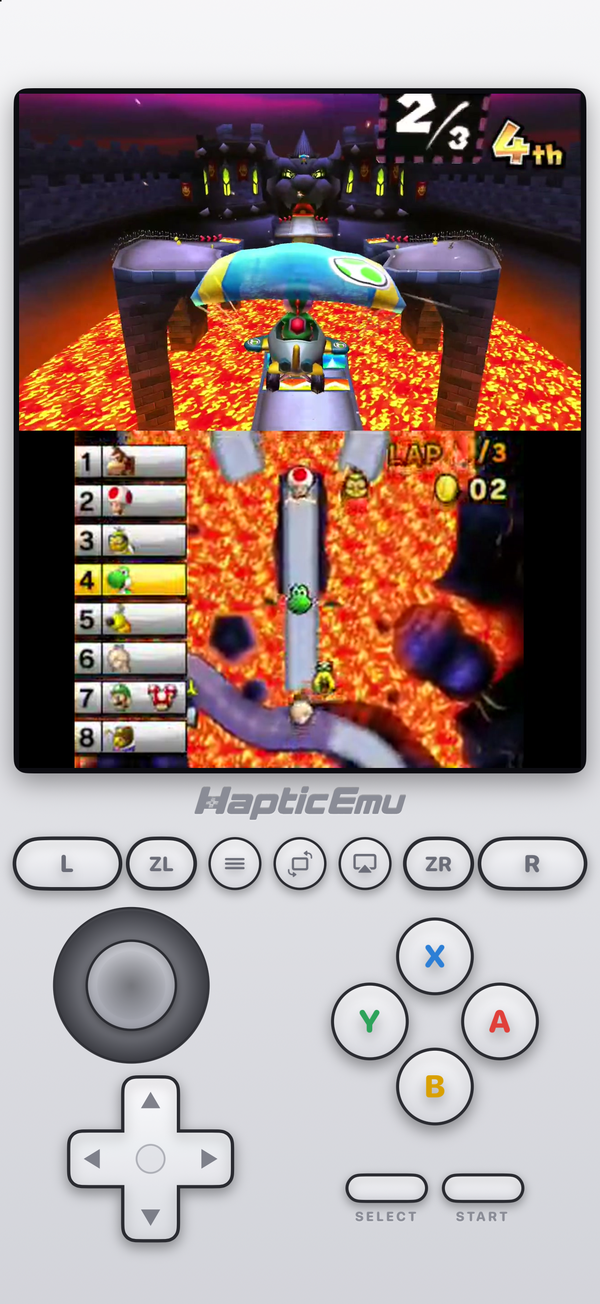
A few years ago, if you asked which 3DS emulator for Android to get, the answer was one word: Citra. Then in March 2024 Citra disappeared, and anyone searching for it since has found a confusing mix of forks, old APKs on download sites and articles that stopped being true. The short version: the 3DS is very much playable on Android, from Google Play, and it runs better here than on an iPhone for a simple technical reason.
Here's what changed, what to use now, and what to expect.
What happened to Citra
Citra was the open-source 3DS emulator for years, on PC and on Android. It was made by the same team as Yuzu, the Switch emulator, and when that team settled Nintendo's lawsuit against Yuzu in March 2024, Citra was taken offline along with it. Its website and code repository went down with it.
Because the code was open source, it didn't vanish. Several forks carried on, and in October 2024 two of the main ones, Lime3DS and PabloMK7's Citra fork, announced they would merge into a single project: Azahar. Azahar's first release came in 2025, and it's now the maintained continuation of Citra, on Google Play.
Skip the old Citra APKs
Copies of the last Citra builds still circulate on APK download sites. They get no fixes, no updates for newer Android versions, and an APK from a random site is a classic way to end up with something on your phone you didn't want. Whatever you choose, install it from Google Play.
The best 3DS emulator for Android, honestly
We make Haptic, so weigh this accordingly. There are two good answers, and they suit different people.
- Want every setting, in an app made only for the 3DS? Azahar. Free, open source, actively developed, and the direct heir to Citra.
- Want the 3DS to just start, on the same shelf as your other systems? Haptic. It runs Azahar's core, adds console-style skins and vibration on every press, and puts your 3DS games next to 25 other systems.
| Azahar | Haptic Emulator | |
|---|---|---|
| Where you get it | Google Play (also GitHub) | Google Play |
| Price | Free, open source | Free to play, with ads; optional Pro |
| Systems | 3DS | 26, incl. 3DS, GameCube, PSP, DS |
| Game files | Decrypted only | Decrypted .3ds, .cci, .cxi, .3dsx |
| CPU recompiler (JIT) | Yes | Yes, Azahar's |
| Settings to tune | Many | A few: resolution 1× to 3× |
| Screen layout | Several | Stacked, as on the console |
| Multiplayer | Added in 2026 | Not for 3DS |
| Library | Game list | Box-art shelves, one per console |
Details as of November 2026, from each project's own site and Google Play listing; they will drift, especially Azahar's, which updates often.
Azahar is the one to get if you like to tune: graphics options, layouts, and the kind of depth Citra users were used to. It's actively developed — its 2026 releases added multiplayer support, among other things — and the project itself recommends installing it from Google Play. Like Haptic, it plays decrypted games only; encrypted ones are refused.
Haptic is the one to get if you'd rather not tune anything. You import a game and press play. The 3DS gets its own skin with a New 3DS control layout, every press answers through the phone's vibration motor, and the game sits on a 3DS shelf with its cover art, next to your GBA, PSP and GameCube games. The trade is fewer options: one stacked layout, no 3DS cheats, no 3DS multiplayer.
Why 3DS on Android has a JIT
The 3DS's processor speaks a different dialect of ARM from your phone's. An emulator has two ways to deal with that. An interpreter reads each 3DS instruction and works out what it means, every single time. A JIT recompiler translates a block of the game's code into your phone's own instructions once, then simply runs the translation from then on. The second is far less work.
Apple doesn't let App Store apps use a JIT, which is why the iPhone version of Haptic runs the 3DS on an interpreter and has to work hard to keep up. Android has no such rule. On Android, Haptic runs Azahar's ARM64 recompiler, the approach Citra used on Android too. The processor side stops being the bottleneck, and the question becomes mostly about your phone's graphics chip.
Which phone you need
Haptic needs Android 9 or later on a 64-bit ARM phone, which is nearly every phone sold since about 2019. That's the minimum to install. For the 3DS, the useful question is the GPU.
- Recent mid-range and flagship phones, whatever the chip — Snapdragon, Dimensity, Tensor or Exynos — run 3DS games best. Haptic renders on the GPU through Vulkan, or OpenGL ES 3.2 where that suits the phone better.
- Older or budget phones can usually handle 2D and lighter 3D games, and may slow down in the busiest scenes of the heaviest ones.
- The first time an effect appears, there can be a brief stutter while the phone prepares it. After that it's cached, so the same moment is smooth next time.
You can render at 1×, 2× or 3× the original resolution. If a game struggles, dropping a step is the first thing to try. And since Haptic is free, the quickest way to know how a game runs on your phone is to try it.
Getting started: the one-minute part
- Install Haptic Emulator from Google Play. No APK, no "unknown sources" setting.
- Tap import and pick the game with Android's file picker. You can also share a file into Haptic from another app — Files, a browser download or your cloud drive app. Zip, 7z and RAR archives are unpacked for you.
- Let it file itself. The game lands on the 3DS shelf with its box art.
- Press play. The 3DS layout loads: Circle Pad, D-pad, A/B/X/Y, L and R, ZL and ZR, Select and Start.
The free version holds a handful of games in its library; Haptic Pro lifts the limit and adds unlimited save states, fast-forward and batch import.
"Decrypted" is the one word that matters
3DS cartridges are encrypted, and a straight copy stays encrypted. Haptic plays decrypted game files only and checks at import, so an encrypted file is refused with a message rather than failing later. .cia files are installers rather than games and are refused too. There's no keys file, firmware or system archive to add: the core ships open-source stand-ins for the system data games look for.
Two screens, and a real controller
The screens are stacked the way the console held them, the wide top screen over the smaller one, and the lower screen takes touch directly — menus, maps and move lists are a tap away. On a foldable or tablet the layout scales to the bigger display.
Controllers are where Android shines. PlayStation and Xbox controllers and other Bluetooth or USB gamepads all work, and on a controller the right stick acts as the New 3DS's C-stick. You can remap buttons, and if you'd rather keep vibration for in-game moments only, the in-game menu lets you switch the button, control and rumble feedback on or off separately.
What doesn't work
- The 3D effect. It needed the 3DS's special screen. Games show in 2D.
- Motion, microphone and camera. Moments that ask you to tilt, blow or take a photo can't be completed.
- Online and local wireless play. Nintendo shut down 3DS online services in April 2024, and Haptic doesn't offer 3DS multiplayer.
- Updates and DLC, since those come as
.ciafiles. - Cheat codes aren't offered for 3DS, though they are for several older systems.
Your game files and saves stay on the phone and are never uploaded. Android's own Google backup doesn't include them, so use Haptic's export or backup if you want a copy somewhere else.
For the curious (optional)
The 3DS ran on an ARM11 processor, an older 32-bit design, with a PICA200 graphics chip, a 400×240 top screen and a 320×240 bottom one. Your phone's processor is a 64-bit ARM chip that can't run that old code directly, which is what the recompiler fixes. The graphics are a separate job: the PICA200's effects are rebuilt as shaders on your phone's GPU, compiled the first time they're needed and kept afterwards. That's why the GPU, not the CPU, decides how well 3DS games run on Android, and why that first-time stutter goes away.
Frequently asked questions
What happened to Citra on Android?
What is the best 3DS emulator for Android?
Does Haptic use JIT for 3DS on Android?
Which Android phones can run 3DS games?
Which 3DS files work, and why was my file refused?
Does Haptic Emulator come with 3DS games?
The 3DS, and 25 more.
Haptic Emulator runs 26 retro systems on Android phones — free to play, and it ships no games: it plays the ones you already have.


Free on Google Play · Android 9 and later · 26 systems