If you looked for a DS emulator for Android any time in the last decade, you were probably told to buy DraStic. That advice has expired. DraStic was made free in 2024 and then disappeared from Google Play in February 2025, and it hasn't come back. The good news is that Nintendo DS on Android didn't go with it. melonDS, the open-source emulator that spent years catching up, is now on Google Play in its own right, and it is also what powers DS in Haptic Emulator.
The DS is also a console that suits a modern phone better than you'd expect. It was built around a stylus and a second screen, and your phone has a far more sensitive touchscreen than the original ever did.
Two screens, one Android phone
The DS had a top screen and a touchscreen below it. Haptic keeps that shape: the two screens are stacked one above the other, exactly as you held them, and only the lower one takes touch. That means your finger lands where your stylus used to, with no remapping and no guessing which half of the picture is live.
- Portrait. The stacked screens sit at the top and a console-style pad fills the space underneath. This is the closest thing to holding a DS, and the layout most people end up using.
- Landscape. Full-screen with floating controls. A stacked DS picture is tall and narrow, so it fills the height of the display and the buttons sit in the room on either side, clear of the screens.
- Your own arrangement. The on-screen layout editor moves the d-pad, face buttons, shoulders and Start/Select wherever your thumbs prefer.
Foldables are a natural fit
Android has something no iPhone does: phones that fold. They happen to suit a console that folded too.
- Flip-style foldables. Stand the phone half-open and Haptic splits its layout at the crease, with the picture above the fold and the controls below it, so nothing is drawn into the bend. It sits on a table like a tiny DS.
- Book-style foldables and tablets. Open on the big inner display, Haptic treats it as a large screen and turns with you, so the stacked DS screens get properly large. Close it and play on the outer display, and it is a phone again.
DS on Android now DraStic is gone
DraStic was the standard answer to "DS emulator Android" for years: a paid app that ran well on the modest phones of its day. It went free in 2024, then vanished from Google Play in February 2025 without an explanation, and its listing still returns nothing as of November 2026. Old guides that point to it are pointing at an app you can no longer install from the Play Store.
Here is the current picture on Google Play, as of November 2026 (these details drift, so check the listings):
- melonDS. A free Android port of the melonDS emulator, focused on DS alone. It offers custom controller layouts, save states, fast-forward, Action Replay codes and gamepad support. A strong pick if DS is all you play.
- Lemuroid. A free, open-source app built on libretro that covers DS among a couple of dozen systems, with a simple library and cloud save sync.
- RetroArch. Free and open-source, with DS through the cores you add yourself. The most configurable, and the most setup.
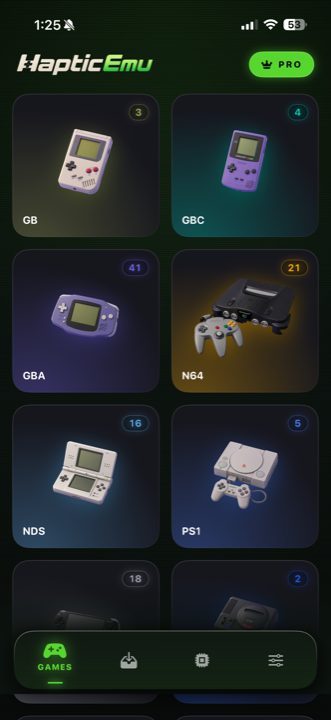
- Haptic Emulator. melonDS emulation with a DS-specific console layout, vibration on every press, box art on shelves, and the same polish across 26 systems, from Game Boy to GameCube.
They are all decent ways to play. Haptic's case is the finish: one library for everything you own, with each console given its own skin rather than a generic overlay. For a fuller comparison, with prices, BIOS, cheats and screen layouts side by side, see the best DS emulators for Android.
Getting started: the 30-second part
Already have your DS game backups on your phone, or in a cloud drive?
- Install Haptic Emulator from Google Play. An ordinary install, like any other app. No APK, no "unknown sources" setting.
- Import your games. Pick files with Android's file picker, or share a file into Haptic from Files, your browser's downloads or a cloud drive app. Zip, 7z and RAR archives are unpacked for you.
- Let the box art land. Covers download automatically and each game files itself on the Nintendo DS shelf.
- Press start. No BIOS, no firmware. The lower screen takes your finger straight away.
The vibration is the point
Every on-screen press answers back through your phone's vibration motor, so the d-pad and buttons feel like buttons rather than glass. Phones with better vibration motors feel crisper. You can switch haptics for buttons and controls on or off separately in the in-game menu.
Which phones run it well
Haptic needs Android 9 or later on a 64-bit ARM phone, which covers practically every phone sold since around 2019. Within that, the DS is one of the friendlier systems: most games run at full speed on mid-range phones, whether the chip inside is a Snapdragon, Dimensity, Tensor, Exynos or Helio. The busiest 3D games ask more, and newer phones run those best.
Controllers are the other comfort upgrade. PlayStation and Xbox controllers and other Bluetooth or USB gamepads connect, with remapping per player. For a DS game you'll still reach for the lower screen when a game wants the stylus, which is part of why the portrait layout works so well.
What doesn't carry over
Two honest gaps. Local wireless play needed two DS consoles talking to each other, and one phone can't recreate that. And the few games that asked you to blow into the microphone or close the lid can be awkward on a device that doesn't fold the same way.
Also worth knowing on Android: Haptic's app data is left out of Google's automatic phone backup, so your saves won't follow you to a new phone by themselves. Export your saves from Haptic (free) or use its full backup (Pro) before you switch phones. Your game files and saves are never uploaded anywhere.
For the curious (optional)
Background only. Skip it freely.
Each DS screen was 256×192 pixels, and the lower one used resistive touch: a flexible layer that registered pressure at a single point, which is why it wanted a firm press from a plastic tip. Phones use capacitive touch, which senses your fingertip and responds to the lightest contact. A fingertip is blunter than a stylus, which very occasionally matters in a game that demands precision, but the panel underneath is far more responsive than the original.
There is also an Android-specific reason the DS runs comfortably. melonDS includes a JIT recompiler, which translates the DS's ARM code into your phone's native code on the fly instead of interpreting it instruction by instruction. Android allows apps to do that and iPhone apps can't, so on Android Haptic runs melonDS with its JIT switched on.
Frequently asked questions
melonDS or Haptic: which should I use for DS on Android?
Do I need a BIOS or firmware to play DS games on Android?
Does the DS touchscreen work with my finger?
Will Nintendo DS games run on my Android phone?
Can I play DS games with a controller on Android?
Does Haptic Emulator come with games?
Your whole childhood. One download.
Haptic Emulator runs 26 retro systems on Android phones, tablets and foldables — free to play, and it ships no games: it plays the ones you already have.


Free on Google Play · Android 9 and later · 26 systems