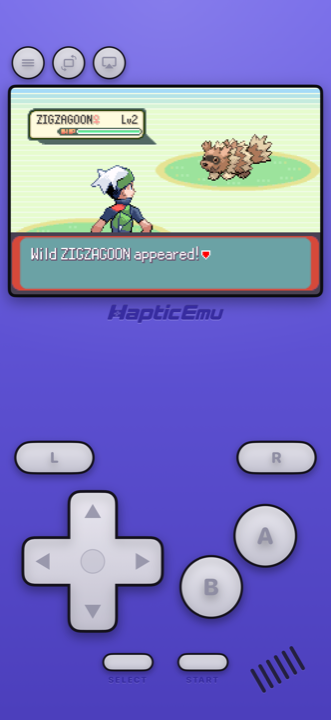
A Pokémon emulator for Android isn't one program so much as a question: which console did your game come out on? Every main-series game from 1996 to 2017 was on a Nintendo handheld, the Game Boy, Game Boy Advance, DS or 3DS, and two of the best-loved side games were on the GameCube. Android phones can play all of them. What changes from one generation to the next is how much of your phone each one needs.
Every generation and its system
| Gen | Games (first release) | System | Haptic Emulator on Android |
|---|---|---|---|
| 1 | Red and Blue (1996), Yellow (1998) | Game Boy | Yes, any phone |
| 2 | Gold and Silver (1999), Crystal (2000) | Game Boy Color | Yes, any phone |
| 3 | Ruby and Sapphire (2002), FireRed and LeafGreen (2004), Emerald (2004) | Game Boy Advance | Yes, any phone |
| 4 | Diamond and Pearl (2006), Platinum (2008), HeartGold and SoulSilver (2009) | Nintendo DS | Yes, most phones |
| 5 | Black and White (2010), Black 2 and White 2 (2012) | Nintendo DS | Yes, most phones |
| 6 | X and Y (2013), Omega Ruby and Alpha Sapphire (2014) | Nintendo 3DS | Yes, recent phones |
| 7 | Sun and Moon (2016), Ultra Sun and Ultra Moon (2017) | Nintendo 3DS | Yes, recent phones |
| Side | Colosseum (2003), XD: Gale of Darkness (2005) | GameCube | Yes, newer phones best |
Years are the first release, which was in Japan; most reached other countries a few months to two years later. Crystal needs a Game Boy Color; Gold and Silver also ran on the original Game Boy. "Any phone" means any phone that can install Haptic: Android 9 or later on a 64-bit chip, which is nearly everything sold since around 2019.
From Sword and Shield in 2019, the main series moved to the Nintendo Switch. Haptic doesn't play Switch games, so this page stops at Generation 7.
Which Pokémon emulator for Android?
On Android you can build a Pokémon setup out of several free, open-source apps, and they're good ones. Azahar, the community successor to the discontinued Citra, plays 3DS and is on Google Play. Dolphin plays GameCube and is on Google Play too. Lemuroid is a free all-in-one whose project page lists Game Boy through DS and 3DS.
Haptic's case is that it's all one app, Game Boy to 3DS plus the GameCube games, with one import, one library and one controller setup. Each console gets its own skin and button layout, every press answers with your phone's vibration motor, and games sit on box-art shelves per system. Haptic uses the same open-source emulation engines underneath for 3DS and GameCube, Azahar and Dolphin. Other apps' details are from their project pages and Google Play listings as of November 2026; they will drift.
Getting set up on Android
- Install Haptic Emulator from Google Play. Free to play, a normal install, no APK and no unknown-sources setting.
- Import a backup of your cartridge or disc. Tap import and pick it in Android's file picker, or share the file to Haptic from Files or a cloud drive app. Zips, 7z and RAR archives are unpacked for you, and each game lands on its system's shelf.
- Press start. Each console has its own controller layout, and every button can be dragged where it suits your hands. PlayStation and Xbox controllers and other Bluetooth or USB gamepads work too.
Two systems are picky about files. 3DS games must be decrypted backups: .3ds, .cci, .cxi or .3dsx. Haptic turns away .cia files and encrypted dumps at import, and it needs no keys or system files. GameCube discs import as .rvz, .gcz, .gcm or .ciso; plain .iso isn't supported yet. No system needed here asks for a BIOS.
What each generation asks of your phone
This is where Android differs most from the iPhone. Android phones range from budget models to gaming flagships, so it helps to know which games run on anything and which want a recent chip, whether that's a Snapdragon, Dimensity, Tensor or Exynos.
- Generations 1 and 2, Game Boy and Game Boy Color. The lightest games here. Any phone that installs Haptic runs them comfortably. The Game Boy on Android guide covers the green screen filter and the other options.
- Generation 3, Game Boy Advance. Also easy on any phone, and the best fit for a touchscreen: four face buttons and two shoulders, all within reach. More in the GBA on Android guide.
- Generations 4 and 5, Nintendo DS. Comfortable on most phones, including modest ones. The lower screen is a touchscreen and your finger is the stylus, which suits the DS games' menus. A foldable or tablet gives both screens more room. See the DS on Android guide.
- Generations 6 and 7, Nintendo 3DS. The heaviest handheld games. They render on your phone's GPU and want a recent mid-range or flagship chip. X and Y and Omega Ruby and Alpha Sapphire are the lighter pair; Sun and Moon slowed down in double battles even on the original console, and they benefit most from a newer phone. The first time a big move animation plays it can stutter while the phone prepares it; after that it's cached. The 3DS on Android guide has the settings.
- Colosseum and XD, GameCube. Among the most demanding things Haptic plays. Newer phones run them best. The GameCube on Android guide covers file formats and controls.
Why Android has an edge for 3DS and GameCube
An emulator can run a game in two ways. An interpreter reads the original console's instructions one at a time and works out what each means, which is simple but slow. A JIT recompiler translates blocks of those instructions into your phone's own code once and then runs the translation directly, which is much faster. iOS doesn't let App Store apps do this, so the iPhone version of Haptic runs 3DS and GameCube games with interpreters. Android allows it, so on Android Haptic runs Azahar's ARM64 recompiler for 3DS and Dolphin's JIT for GameCube. It makes a real difference for the Generation 6 and 7 games and the GameCube side games, the heaviest ones on this page.
What you can't do
- Trade. Every generation traded between two consoles, by link cable or wireless, and Haptic plays each game on one phone. Trade evolutions such as Haunter, Kadabra, Machoke and Graveler are out of reach. Every main story still plays through.
- Bring GBA Pokémon into Colosseum or XD. Those games could import your team from Ruby, Sapphire, FireRed, LeafGreen or Emerald over a GameCube-to-GBA link cable. That needs the link, so it's out too; both games still play through on their own.
- Play online. Nintendo shut down the DS online service in 2014 and the 3DS one in April 2024. That affects everyone, emulator or not.
- Play Wii or Switch Pokémon. Pokémon Battle Revolution is a Wii game, and Haptic refuses Wii discs. Sword, Shield and everything after are Switch games, which it doesn't play.
- Get the games from the app. Haptic ships no games, ROMs, keys or BIOS files. It plays backups of games you already own.
Beyond the main series
Pokémon Pinball is a Game Boy Color game, the first Mystery Dungeon games are on the GBA and DS, and Pokémon Snap and Pokémon Stadium are on the Nintendo 64, which Haptic also plays. They all sit on the same shelves as the main games.
For the curious (optional)
Each generation was built around its console, and that shows on a phone. The Game Boy games used a d-pad and two buttons, so they fit anywhere. The DS games put menus on the touchscreen, so a finger beats on-screen buttons. Colosseum and XD were full 3D console RPGs designed for a TV, which is why they sit at the demanding end alongside the 3DS games. If you'd rather play those two on a big screen, Haptic Pro's Play on TV sends the game to a TV over a USB-C to HDMI cable or by casting from Android's Quick Settings, and your phone becomes the controller.
Frequently asked questions
How do I play Pokémon on my Android phone?
Which Pokémon games can Haptic Emulator play on Android?
Can my phone run the 3DS Pokémon games?
Can I play Pokémon Sword, Scarlet or other Switch games?
Can I trade Pokémon or evolve Haunter and Kadabra?
Does Haptic Emulator come with Pokémon games?
Every generation you played. One app on your phone.
Haptic Emulator plays 26 retro systems on Android phones and tablets — Game Boy to 3DS and GameCube, free to play, and it ships no games: it plays the ones you already have.


Free on Google Play · Android 9 and later · 26 systems