Performance won't decide this. The Game Boy Advance is one of the lightest systems you can emulate, and every app on this page runs the whole library at full speed on any phone that can install it. What separates them is everything around the game: what it costs, whether it shows ads, whether it can link two games together for a Pokémon trade, where your saves go, and whether the GBA is the only thing you play.
We make Haptic, one of the apps below, so take this with that in mind. We've tried to be fair, including about where the others are ahead, and on the GBA several of them are.
The short version
- GBA, and you want to trade Pokémon or play link games? LinkBoy. It's the free successor to My Boy!, from the same developer.
- GBA only, free, and without ads? Pizza Boy A.
- Already bought My Boy! years ago? Keep using it; it still works and still gets updates.
- GBA plus PlayStation, PSP, SEGA, DS or anything else, with nothing to set up? Haptic Emulator. 26 systems, one app.
- Want a free, open-source all-in-one? Lemuroid for simplicity, RetroArch for control.
Side by side
| LinkBoy | My Boy! | Pizza Boy A | Haptic Emulator | Lemuroid | RetroArch | John GBAC | |
|---|---|---|---|---|---|---|---|
| Systems | GBA, GBC, GB | GBA | GBA only | 26: Nintendo, Sony, SEGA, Atari, NEC, SNK, arcade, DOS | 20+ | Dozens, via cores | GBA, GBC |
| Price | Free; one-time upgrade | Paid, one-time | Free; paid Pro | Free to play; optional Pro | Free, open source | Free, open source | Free; pay to remove ads |
| Ads | No | No | No | Yes, free version | No | No | Yes |
| Link cable / multiplayer | Up to 4 players, one device or local network | Yes, one device or Bluetooth/Wi-Fi | Local and Wi-Fi in Pro | No | Not listed | Netplay | Not listed |
| Cheats | Yes | Yes | Pro | Yes, GameShark and CodeBreaker | Not listed | Yes | Yes |
| Fast-forward | — | Yes | Yes | Pro | Yes | Yes | — |
| Cloud saves | Google Drive | Google Drive | Google Drive in Pro | No; local, exportable free | Cloud save sync | — | Dropbox, via a companion app |
| RetroAchievements | Yes | — | Yes | No | — | Yes | — |
| On-screen layout | On-screen pad | On-screen pad | Customisable; skins in Pro | GBA-shaped, drag any button, vibration on press | Resizable, movable | Generic overlay | On-screen pad |
| Ships games or BIOS | No | No | No | No | No | No | No |
Competitor details come from their Google Play listings and developers' announcements in November 2026 and will drift; a dash means we couldn't find it stated. Prices vary by country, so we haven't quoted them.
LinkBoy: My Boy!, rebuilt
LinkBoy comes from Pixel Respawn, the developer behind My Boy!, and it arrived on Google Play in early 2025 as that app's successor. At launch it was thin, and Android Authority advised My Boy! owners to wait. Its listing has caught up since: Game Boy and Game Boy Color alongside the GBA, cheats, physical controllers and keyboards, RetroAchievements, Google Drive sync and backup, and link cable emulation for up to four players, on one device or over the local network.
It's free to download, without ads, and a one-time in-app purchase unlocks extras such as more save state slots. If the GBA is your system and Pokémon trading is the reason you're here, start with LinkBoy.
My Boy!: the one everyone recommends
For most of the last decade, "best GBA emulator for Android" had one answer, and forum threads still give it. My Boy! is a paid app, and its link cable emulation works on one device or between two phones over Bluetooth or Wi-Fi, which is why Pokémon players sought it out. It syncs saves through Google Drive and takes GameShark, Action Replay and CodeBreaker codes.
It's still on Google Play and was still being updated in 2026. If you already own it, there's no urgent reason to move. If you're buying today, LinkBoy is where its developer says the future features are going, and it costs nothing to try first.
Pizza Boy A: the best free GBA-only app
Pizza Boy A (it used to be Pizza Boy GBA) is GBA only; Game Boy and Game Boy Color are its sibling app's job. The free Basic version shows no advertising and already covers what most people want: save states, fast-forward and slow motion, controller support, shaders and RetroAchievements. The one-time Pro upgrade adds rewind, cheats, custom skins, box art, Google Drive sync, auto save, local and Wi-Fi multiplayer, custom BIOS support and support for the handful of cartridges with built-in sensors.
If you want one free app that does the GBA and nothing else, this is it.
Haptic: the GBA as one shelf of many
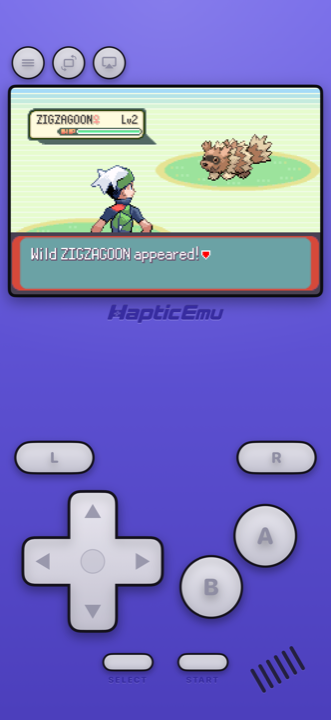
Haptic plays the GBA on mGBA, one of the most accurate open-source GBA emulators, so no BIOS file is needed. What it adds is the console around it. The on-screen pad is the GBA's own layout, indigo shell and L and R shoulders included, with every button draggable and a buzz from the phone's vibration motor on each press. Import a game and it lands on a GBA shelf with its cover art. GameShark and CodeBreaker cheats work, and PlayStation, Xbox and other Bluetooth or USB controllers map the way you'd expect.
The reason to pick it over the GBA-only apps is the other 25 shelves. If your collection has a PlayStation disc, a PSP game, a Mega Drive cartridge or a 3DS game in it, Haptic plays those too, with the same controls and one library. Our GBA guide for Android walks through the setup.
The honest trade
On the GBA specifically, Haptic does less than the specialists. It has no link cable, so no Pokémon trading; no cloud sync, so moving phones means exporting your saves first (they're never uploaded, and exporting is free); and the free version shows ads and holds a few games at a time. Fast-forward, screen filters such as the handheld LCD look, and unlimited save states come with Pro. If the GBA is all you play, LinkBoy or Pizza Boy A will suit you better.
Lemuroid and RetroArch: free all-in-ones
Lemuroid is the simplest free way to play many systems. It's open source, built on libretro, free of advertising, and covers more than 20 systems including GBA, SNES, PlayStation, PSP, DS and 3DS. Point it at a folder and it scans your games; saves can sync to the cloud.
RetroArch is the most configurable app in emulation. It runs the GBA through libretro cores such as mGBA, and it has netplay, shaders, RetroAchievements and a setting for everything. The cost is setup: you choose a core, configure the controls and build your own overlay. If you already use it on a PC or a handheld, you'll want it here too.
John GBAC and the rest
John GBAC plays GBA and Game Boy Color, takes cheats and controllers, and can sync saves to Dropbox through a companion app. It's free with ads, and a purchase removes them. The same developer's older John GBA and John GBA Lite still turn up in old guides.
You'll also meet GBA.emu, a paid app from the developer of the long-running .emu series, and a long tail of lookalikes. Be wary of any GBA app that promises games included or shows full-screen ads before you've loaded anything: the good ones on this page never ship games.
Which one can trade Pokémon?
Trading on the GBA meant two consoles joined by a link cable, so an emulator has to fake that cable. LinkBoy and My Boy! both do: on one phone, running two games side by side, or between two phones. Pizza Boy A has local and Wi-Fi multiplayer in Pro. Haptic doesn't, so trade evolutions like Kadabra, Machoke, Graveler and Haunter are out of reach in it; every main story still plays through without them. Which handheld each generation needs is in the Pokémon emulator guide for Android.
For the curious (optional)
Several of these apps share code. Haptic, Lemuroid and RetroArch can all run mGBA underneath, which is why their GBA accuracy is so close. The GBA-only apps, My Boy!, LinkBoy, Pizza Boy A and John GBAC, use their own emulators. On a system this well understood, all of them get nearly every game right, and the differences you'll notice are in the features around the game, not in the emulation.
Frequently asked questions
What is the best GBA emulator for Android?
Is My Boy! still the best GBA emulator for Android?
What is the best free GBA emulator for Android?
Which GBA emulator for Android can trade Pokémon?
Do I need a GBA BIOS file on Android?
Do any of these apps include GBA games?
GBA, and 25 more.
Haptic Emulator runs 26 retro systems on Android phones, tablets and foldables — free to play, and it ships no games: it plays the ones you already have.


Free on Google Play · Android 9 and later · 26 systems