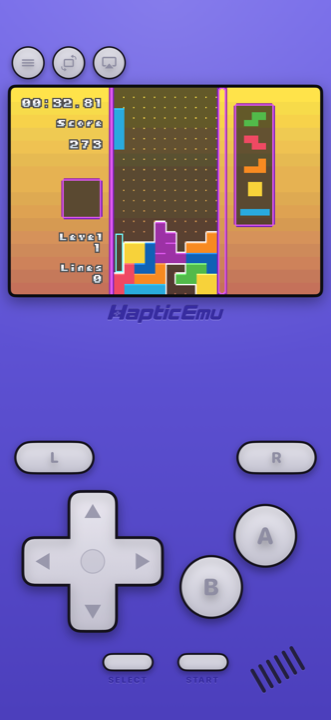
Of all the things a GBA emulator for Android can do, playing the games is the easy part. The Game Boy Advance is a light, thoroughly understood system, and any phone that installs a modern emulator has power to spare for it. What separates the apps on Google Play is everything around the game: how the controls feel under your thumbs, how your games are organised, and what happens to your saves.
And it is a crowded shelf. Search the Play Store for "GBA emulator" and you'll find a few excellent apps and a long tail of lookalikes. Here's how to get set up with Haptic, and how it compares with the other good ones.
What makes it feel like a Game Boy
The original GBA had no backlight. You played it near a window or tilted it toward a lamp. On a phone, those same sprites are bright and sharp for the first time, which is a bigger deal than it sounds: some of the best pixel art ever made was hard to actually see on the hardware it was made for.
- A layout shaped like a GBA. D-pad, A and B, Start and Select, and the L and R shoulders along the top, in the indigo shell. Not one generic gamepad stretched over every console.
- A buzz under every press. Each button answers through your phone's vibration motor, so you're not tapping silent glass. How crisp it feels depends on the phone; ones with better vibration motors feel sharper. You can turn it off per type in the in-game menu.
- Portrait or landscape. Portrait gives you the console-style pad below the screen; full-screen landscape puts floating controls either side of a bigger picture.
- Foldables and tablets. The layout adapts to large screens.
Setting up a GBA emulator on Android
If the game file is already on your phone, this takes about a minute.
- Install Haptic Emulator from Google Play. An ordinary install, no APK and no "unknown sources" setting. It needs Android 9 or later and a 64-bit phone, which covers practically every phone sold since about 2019.
- Tap import and pick your game. Android's file picker opens; choose the file from your phone, an SD card or a cloud drive. Or skip the picker entirely and share a file into Haptic from another app: the Files app, a browser download, or your cloud drive app's share button.
- Watch the box art appear. Zip, 7z and RAR archives are unpacked for you, the cover downloads on its own, and the game lands on your Game Boy Advance shelf as a 3D box rather than a filename.
- Press start. The GBA controls come up automatically. No BIOS file needed.
Got a whole folder of backups? Batch import, part of Haptic Pro, brings them all across in one go. The free library holds a handful of games.
Saves: what's free, what's Pro
Games with their own save battery save exactly as they always did, and you can export those saves whenever you like, free. Save states, the snapshot-anywhere kind, are where Pro comes in: unlimited save states with Haptic Pro, plus auto-save. On the free version you can earn a save state by watching a short ad, and loading one is always free.
GBA emulators for Android: how the options compare
Every app here emulates the GBA accurately. The differences are scope, price and extras. For all seven worth knowing, including LinkBoy, My Boy!'s free successor, see the best GBA emulator for Android.
| Haptic Emulator | My Boy! | Pizza Boy A | Lemuroid | RetroArch | |
|---|---|---|---|---|---|
| Systems | 26: Nintendo, Sony, SEGA, Atari, NEC, SNK, arcade, DOS | GBA only | GBA only | Around 20 | Dozens, via cores you install |
| Price | Free to play with ads; optional Pro | Paid; free Lite version in some regions | Free; paid Pro version | Free, open source | Free, open source |
| Setup before first game | Import and play, box art appears on its own | Open a file and play | Open a file and play | Point it at a folder, it scans | Install a core, configure controls |
| On-screen layout | GBA skin, drag any button, vibration on every press | On-screen pad | Fully customisable; custom skins in Pro | Resizable, movable | Generic overlay, configure yourself |
| Link cable / multiplayer | No | Link cable emulation, on one device or over Bluetooth/Wi-Fi | Local and Wi-Fi multiplayer in Pro | Not listed | Netplay |
| Fast-forward | Yes (Pro) | Yes | Yes | Yes | Yes |
| Saves | Local, exportable free; never uploaded | Google Drive sync | Google Drive sync in Pro | Cloud save sync | Local |
| Ships games or BIOS | No | No | No | No | No |
Competitor details come from their Google Play listings and project pages in November 2026 and will drift. The shape of the comparison won't.
- Only ever going to play GBA, and want link cable features? My Boy!. It's been a favourite for years, and its link cable emulation is the reason Pokémon players seek it out.
- Want a free GBA-only app? Pizza Boy A, which also supports RetroAchievements.
- Want a free all-in-one? Lemuroid, the simplest, or RetroArch, the most configurable.
- GBA plus PlayStation, PSP, SEGA, DS or anything else, and no wish to set things up? Haptic. One app, one set of shelves, one controller setup, and the GBA plays exactly as well. More on the all-in-ones in the best emulator for Android.
Can you trade Pokémon?
Not in Haptic Emulator. Trading GBA Pokémon meant two consoles joined by a link cable, and Haptic runs one GBA on one phone with no link support. Trade evolutions like Kadabra, Machoke, Graveler and Haunter are out of reach; every main story still plays through without one.
If trading matters to you, My Boy! is the app that advertises link cable emulation. Which handheld each Pokémon generation needs is covered in the Pokémon emulator guide for Android.
Two things worth doing
Turn on the handheld LCD filter
GBA art was drawn for a small, dim, unlit screen, and on a bright modern phone the colours can look harsher than you remember. The handheld LCD filter puts a little of that original panel back. It's part of Haptic Pro, alongside CRT, scanline and VHS looks.
Put the buttons where your hands want them
The layout editor lets you drag every on-screen button and resize the D-pad. Or pair a real controller: PlayStation and Xbox pads and other Bluetooth or USB gamepads all work, and for a 2D platformer a physical D-pad is hard to beat. Clip-on phone controllers that connect over USB-C work too.
A couple of things to know
Sensor cartridges are awkward. A handful of GBA games had tilt or light sensors built into the cartridge. A phone isn't a good stand-in for those, and it's a small corner of the library.
Back up your saves yourself. Haptic's data is excluded from Android's Google backup, so if you're switching phones, use Haptic's export or backup first. Your game files and saves are never uploaded anywhere.
For the curious (optional)
The Game Boy Advance ran at 240×160 pixels, unlit on the original model, so its artists drew bright, high-contrast sprites to fight a dim screen. That compensation can tip into garish on a modern phone, which is what the LCD filters exist to undo.
Under the hood, Haptic's GBA uses mGBA, one of the most accurate open-source GBA emulators, which is also why no BIOS file is needed. Speed isn't a factor: the GBA is one of the lightest systems Haptic plays, so anything you adjust is about presentation, not performance.
Frequently asked questions
Should I use My Boy! or Haptic for GBA on Android?
Is there a free GBA emulator for Android?
Do I need a GBA BIOS file on Android?
How do I get my GBA games into the emulator?
Can I use a controller for GBA games on Android?
Can I trade Pokémon in a GBA emulator on Android?
GBA, and 25 more.
Haptic Emulator runs 26 retro systems on Android phones, tablets and foldables — free to play, and it ships no games: it plays the ones you already have.


Free on Google Play · Android 9 and later · 26 systems