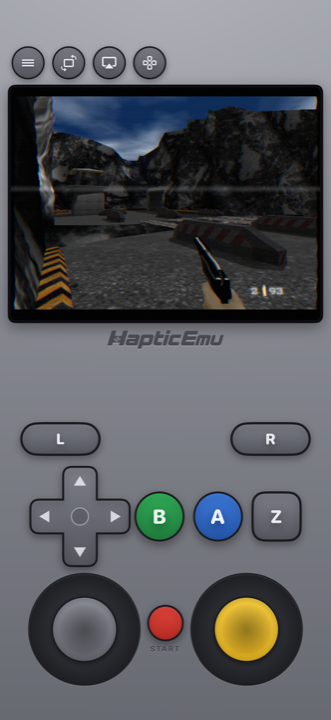
The Nintendo 64 is the console people most want back and have the least access to. Cartridges are expensive, the console needs an old television or an adapter, and most of the library was never re-released. The phone in your pocket runs all of it.
Three App Store apps do the job: Delta, Haptic Emulator and RetroArch. The emulation underneath is good in all three. What separates them is the controller and what else they play.
The short version
- Only Nintendo, and you want cloud sync between devices? Delta. It covers NES through DS, N64 included, and syncs saves through Google Drive or Dropbox.
- N64 plus PlayStation, PSP, SEGA or arcade? Haptic. Same per-system care for the N64 controller, 24 systems on one shelf, free to play, and everything stays on your phone.
- Want to pick your own N64 core and tune it? RetroArch. Most options, most setup.
Side by side
| Delta | Haptic Emulator | RetroArch | |
|---|---|---|---|
| Systems | Nintendo only: NES to DS | 24: Nintendo, Sony, SEGA, Atari, NEC, SNK, arcade, DOS | Dozens, via cores you install |
| Price | Free; optional patron tiers | Free to play; optional Pro | Free |
| C-buttons | Four buttons | Four buttons, in the original cluster | Depends on the overlay you set up |
| Analog stick | On-screen stick, position set by the skin | Resize, move, tune travel and sensitivity per game | Configurable overlay |
| Haptic feedback on press | Yes | Yes, Taptic Engine | Not by default |
| Real controllers | Yes, incl. Switch and NSO N64 pad | Yes: PlayStation, Xbox, MFi | Yes |
| Local two-player | Yes | Yes, two controllers | Yes |
| Saves | Cloud sync via Google Drive or Dropbox | Local, exportable free; no cloud account needed | Local |
| Play on a TV | Standard iOS mirroring | Built in (Pro), phone as controller | Standard iOS mirroring |
| Minimum iOS | iOS 14 | iOS 18 | iOS 12 |
| Ships games or BIOS | No | No | No |
Competitor details come from their App Store listings in October 2026 and will drift. The shape of the comparison won't.
The controller is the whole question
That controller was genuinely odd: three grips, a stick nobody had seen before, a trigger underneath, and four little yellow C-buttons. On a touchscreen, every one of those is a design decision, and it's where emulators give themselves away.
The C-buttons are the test. Lots of apps fold them into a second thumbstick, and it falls apart the moment a game uses them as buttons, which is constantly. They're your weapons in the shooters, your camera in the platformers, your item slots in the adventures. Delta and Haptic both pass this test; both draw four real buttons. RetroArch passes if you build the overlay that way.
The stick is the second test. Haptic lets you size it, move it, and set how far it has to travel and how sensitive it is, per game, which is worth thirty seconds in any 3D platformer. Delta's stick works well, but its size and position come from the skin you're using rather than from you. In RetroArch it's whatever you configure.
Or skip the touchscreen
All three apps take a real controller, and for N64 that's the comfortable answer. A PlayStation or Xbox pad over Bluetooth, or a clip-on controller, and the C-button problem disappears. Delta additionally supports the Nintendo Switch Online N64 controller, which is a nice touch if you own one.
Delta: the Nintendo specialist
Delta is the app most people have heard of, and deservedly. It was first through the door when Apple changed the rules in April 2024, it's polished, and its N64 support is solid. Its particular strength is sync: games, saves, cheats and controller layouts follow you between devices through Google Drive or Dropbox.
Its limit is scope. Delta plays Nintendo systems from the NES to the DS, and nothing else. If you own PlayStation or PSP games, or anything from SEGA, you need a second app with its own interface and its own saves. For a lot of people that second app ends up being the one they open.
Haptic: N64 on the same shelf as everything
Haptic gives the N64 the same treatment: four yellow C-buttons in their cluster, the Z trigger where it belongs, and a stick you can tune. Every press answers back through the Taptic Engine. Then it does the same for 23 other systems, so your N64 games sit on a shelf next to your PlayStation and Game Boy ones, with box art that appears on its own.
N64 is free to play. Saves are yours: export them whenever you like on the free version, no cloud account required, and nothing leaves the phone unless you send it. Pro adds unlimited save slots, fast-forward, screen filters, batch importing and TV playback with the phone as the controller, which is how an N64 is meant to be played.
The honest limit is the opposite of Delta's: no cloud sync between devices. If you play the same save on an iPhone and an iPad and want it to follow you automatically, Delta does that and Haptic doesn't.
RetroArch: pick your own core
RetroArch lets you choose between N64 cores and tune them, and its Mupen64Plus-Next core is as accurate as N64 emulation gets. The cost is doing it all yourself: install the core, configure the overlay, learn the menus. If you already run RetroArch elsewhere you'll feel at home. If not, here's what you're signing up for.
One tip for all three
Don't go for maximum sharpness. The N64 blurred its own graphics on purpose and was built for televisions that softened them further, so a razor-sharp picture exposes seams the original blur was hiding. A light old-television filter usually looks more like the console you remember than no filter at all. Try it both ways on something familiar.
For the curious (optional)
The N64 is a far lighter load than the PSP for an emulator, because its 3D is simple by modern standards and its textures were tiny. Any iPhone from the last several years runs the whole library at full speed, in all three apps. Differences you notice between them are about controls and interface, not performance.
Frequently asked questions
Does Delta play N64 games on iPhone?
Which N64 emulator has the best controls on a touchscreen?
Do N64 games run at full speed on an iPhone?
Do any of these apps include N64 games?
Can two people play N64 on one iPhone?
N64, and 23 more.
Haptic Emulator runs 24 retro systems on iPhone and iPad — free to play, and it ships no games: it plays the ones you already have.

Free to play · all 24 systems · iPhone & iPad