If you've spent any time reading about emulators you'll have hit the name RetroArch. It comes up constantly, it's free, and it has a devoted following.
It's also where a lot of people quietly give up. Here's a fair account of what it is and whether you actually want it.
What it actually is
RetroArch isn't really an emulator — it's a shell that other emulators plug into. Each console is handled by a separate module you install into it, which the project calls a "core."
That design is clever, and it's why the project is so well regarded. Features work the same way across every console, it runs on practically any device, and it's built by people who care a great deal about getting things exactly right.
Why people bounce off it
The same flexibility that makes it powerful makes it demanding, and that's sharper on a phone:
- You install consoles yourself. Often there are several options for the same console, and it's on you to know which one to pick.
- The menus are dense. It's a desktop-style interface with a great many technical settings, navigated with your thumb.
- Controls need setting up. The on-screen buttons aren't tailored to each console out of the box.
- There's a vocabulary to learn. Cores, shaders, overlays, content directories — all real things, all standing between you and playing something.
None of that is a flaw exactly. It's built for people who want complete control, and it delivers that. It's just a poor fit for "I'd like to play a Game Boy game on the train."
When RetroArch is right for you
Genuinely use it if you want to choose between different versions of the same console emulator, build your own visual effects, or keep an identical setup across your phone, PC and handheld. Or if tinkering is part of the fun — plenty of people enjoy that, and it's a legitimate hobby in its own right.
When something simpler wins
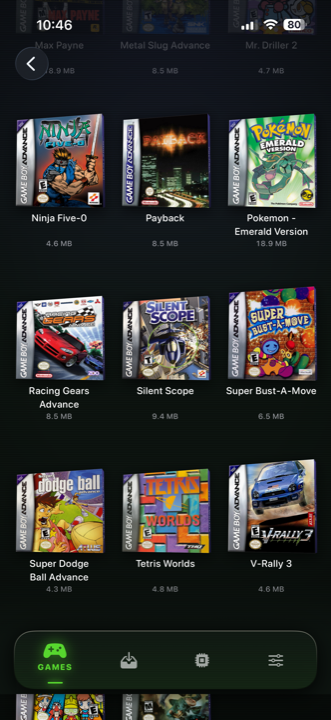
Use a purpose-built iPhone app if you'd rather just play. That's the trade Haptic makes:
- Nothing to install per console. Import a game and it's filed and ready.
- Controls already right. Each console gets its own layout — N64 buttons, PlayStation's four shoulders, DS touch — and you can drag anything anywhere.
- A shelf, not a file browser. Box art downloads by itself and games sort themselves by console.
- iPhone things that just work. Importing from Files, playing on your TV, the Taptic Engine, proper iPad support.
- Filters as presets. Tap "old television" rather than assembling one yourself.
You can have both
Lots of people run something configurable on a computer and something simple on their phone. They're different tools for different moods, and nobody's making you choose.
What they have in common
Neither comes with games. RetroArch doesn't provide them, and Haptic ships no games, no ROMs and no BIOS files and provides no way to find them. Both are players for game files you already have.
For the curious (optional)
Only if the terminology interests you.
RetroArch is what's called a "frontend," built on something called Libretro — a common interface that individual emulators can be written to. An emulator packaged that way becomes a core, and RetroArch loads it. Because they all speak the same interface, shared features like save states, rewind, controller mapping and visual effects only had to be written once and then work everywhere.
That's genuinely elegant engineering, and it's why the same project runs on everything from phones to games consoles to tiny single-board computers. The cost is that setup decisions a purpose-built app would quietly make for you get handed to you instead — which is the whole trade, in a sentence.
Frequently asked questions
Is RetroArch an emulator?
Why is RetroArch hard to set up on an iPhone?
What's the simpler alternative on iPhone?
Do either of them come with games?
Can I use both?
Your whole childhood. One download.
Haptic Emulator runs 21 retro systems on iPhone and iPad — free to play, and it ships no games: it plays the ones you already have.

Free to play · all 21 systems · iPhone & iPad