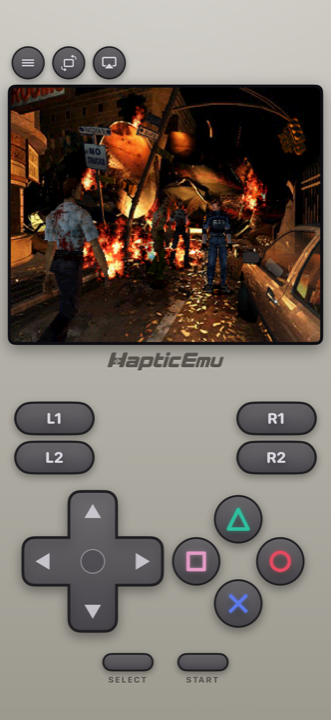
The first thing to know: the app most people have heard of, Delta, doesn't play PlayStation. It's Nintendo only. So if you came here with a stack of PS1 discs and Delta already installed, you need something else, and there are three real options on the App Store: Gamma, Haptic Emulator and RetroArch.
The short version
- PlayStation is the only system you care about? Gamma. It's a dedicated PS1 app from a developer who's been doing this for a very long time, with the most rendering options.
- PlayStation plus your Game Boy, N64, PSP or SEGA games? Haptic. PS1 free to play, on one shelf with 23 other systems, with memory card saves you can take with you.
- Want to choose your own PS1 core? RetroArch. More control, more setup.
Side by side
| Gamma | Haptic Emulator | RetroArch | |
|---|---|---|---|
| Systems | PS1 only | 24, PS1 included | Dozens, via cores you install |
| Price | Free with in-app purchases | Free to play; optional Pro | Free |
| Shoulder buttons on screen | All four | All four, L1/L2/R1/R2, every control movable | Depends on the overlay |
| Multi-disc games | Yes | Yes, swap discs in-game | Yes, with setup |
| Memory card saves | Yes, with save syncing | Yes, exportable free, stays on the phone | Yes |
| Picture | High-res upscaling, geometry correction | Native picture plus CRT-style filters (Pro) | Shaders, configure yourself |
| Achievements | RetroAchievements | No | RetroAchievements |
| Real controllers | Yes | Yes: PlayStation, Xbox, MFi | Yes |
| Play on a TV | Standard iOS mirroring | Built in (Pro), phone as controller | Standard iOS mirroring |
| Minimum iOS | iOS 15 | iOS 18 | iOS 12 |
| Ships games or BIOS | No | No | No |
Competitor details come from their App Store listings in October 2026 and will drift. The shape of the comparison won't.
Gamma: the PlayStation specialist
Gamma comes from ZodTTD, who was writing emulators for the iPhone back when that meant jailbreaking it, and it shows. It does one console and does it thoroughly: cover art, custom controller skins, save state syncing, RetroAchievements, and a rendering pipeline that can draw PS1 games at many times their original resolution with the wobbly 3D geometry corrected.
If you want Gran Turismo to look like it was remastered, Gamma is the one. If you own nothing but PlayStation games, it's an easy recommendation.
Its limit is the obvious one: it's a PS1 app. Your other consoles need other apps.
Haptic: PlayStation as one shelf of many
Haptic plays PS1 as one of 24 systems, and takes the console seriously: all four shoulder buttons on screen because so much of the library needs them, face buttons in their diamond, every control movable. Multi-disc games just work: import every disc and swap from inside the game when it asks. The app keeps the equivalent of a memory card, and you can export it at any time on the free version, so fifty hours in an RPG are never locked inside an app.
On the picture, Haptic takes the opposite view to Gamma. PS1 games were made for tube televisions, which smoothed over the wobbling 3D and blended the fine checkerboard patterns artists used to fake extra shades. Rather than sharpening all that up, Haptic ships CRT-style filters that put the softening back. Many games look more like themselves that way. Which approach you prefer is taste; it's worth knowing the two apps have picked different sides.
Everything stays on the phone. There's no cloud account, nothing is uploaded, and the privacy policy is short enough to actually read. Pro adds unlimited save slots, fast-forward, the filters, batch importing and TV playback with the phone as the controller.
About the BIOS
Some PlayStation emulators need a BIOS file from a real console before certain games run. Haptic ships no games, ROMs or BIOS files and can't supply one. If a game asks for a PlayStation BIOS, it has to come from a PlayStation you own. That's true of every App Store emulator, whatever their descriptions imply.
RetroArch: choose your own core
RetroArch runs PlayStation through cores you install yourself, and lets you choose between them and tune each one. If you already use it on a PC you'll want the same here. If you don't, the on-screen overlay and the desktop-style menus are a lot to get through before your first game. More on that here.
What none of them can do
- Supply games or a BIOS. You bring backups of discs you own.
- Link cable or two-console play. Local two-player with two controllers on one device works; a cable between two phones doesn't exist.
- Make PS1 games small. Disc images are hundreds of megabytes each. Budget storage accordingly.
For the curious (optional)
The original PlayStation ran most games at 320×240 and couldn't do sub-pixel precision in its 3D, which is why textures swim and polygons jitter. Upscaling with geometry correction, which Gamma offers, fixes both and produces a picture the console never showed. CRT filters, which Haptic offers, leave both in place and hide them the way a 1997 television did. Neither is wrong. They're two different ideas of what "looks right" means.
Frequently asked questions
Is there a PlayStation 1 emulator on the iPhone App Store?
Does Delta play PS1 games?
Do I need a BIOS file for PS1 games on iPhone?
Can I play multi-disc PlayStation games on iPhone?
Which PS1 emulator has the best graphics on iPhone?
PlayStation, and 23 more.
Haptic Emulator runs 24 retro systems on iPhone and iPad — free to play, and it ships no games: it plays the ones you already have.

Free to play · all 24 systems · iPhone & iPad