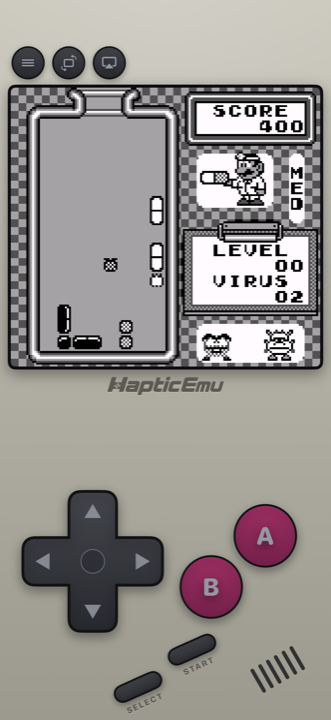
If you're after a Game Boy emulator for Android, you have more good choices than for any other system. Android had capable Game Boy apps years before the iPhone allowed emulators at all, and the Game Boy is so light that every one of them runs it on a modest phone. So the real question isn't whether it will work. It's which app suits the rest of your collection, and how you like to play.
Which Game Boy emulator for Android?
Four apps on Google Play are worth knowing. Two are all-in-ones that play many systems, and two are dedicated Game Boy emulators with extras only a Game Boy app would bother with.
| Haptic Emulator | Lemuroid | My OldBoy! | Pizza Boy C | |
|---|---|---|---|---|
| Game Boy & Color | Yes, as two separate shelves | Yes | Yes | Yes |
| Other systems | 26 in all: Nintendo, Sony, SEGA, Atari, NEC, SNK, arcade, DOS | Many, from NES to PSP and DS | None; GBA is a separate app, My Boy! | None; GBA is a separate app, Pizza Boy A |
| Price model | Free to play with ads; optional Pro | Free and open source | Paid; a free Lite version exists | Free Basic version; paid Pro |
| Link cable between devices | No | Not in its feature list | Yes, over Wi-Fi or Bluetooth | Yes, over Wi-Fi or Bluetooth |
| Where it shines | Console skins, vibration on every press, box-art shelves | Simple, free, many systems | Game Boy Camera and Printer, Super Game Boy palettes, cheats | Accuracy is its pitch; shaders |
- Game Boy plus a PlayStation, PSP, SEGA or arcade game or two? Haptic. One library for 26 systems, one controller setup, and your game files and saves are never uploaded.
- Want free and open source, and don't mind a plainer look? Lemuroid. It's a good app, and it also syncs saves to the cloud.
- Only Game Boy, and you want to trade with a friend's phone? My OldBoy! or Pizza Boy C. Link-cable emulation across two devices is the thing a dedicated app does that an all-in-one usually doesn't.
RetroArch is on Google Play too, as RetroArch and the 64-bit RetroArch Plus, both updated in October 2026. The Play versions have no core downloader, though; the full version with it is on the RetroArch website. Other apps' details come from their Google Play listings and project pages as of November 2026; they will drift, so check each listing before you download.
Setting it up on Android
- Install Haptic Emulator from Google Play. It needs Android 9 or later on a 64-bit phone, which is nearly every phone sold since around 2019. No APK, no unknown-sources toggle.
- Put your game files somewhere the phone can see them. Your Downloads folder, an SD card, or a cloud drive app all work. These should be backups of cartridges you own.
- Tap import and pick them in Android's file picker. Or skip the menu entirely: in Files or your cloud drive app, share a game file to Haptic. Zips, 7z and RAR archives are unpacked for you.
- Let the box art land, then press start. Covers download on their own, and each game files itself on the Game Boy or Game Boy Color shelf.
The free library holds a handful of games at a time. Haptic Pro makes room for a bigger collection and adds batch import, so you can bring in a whole folder at once.
Will it run on my phone?
Yes. On Android, the phone you own matters a lot for some systems: GameCube and 3DS want a recent mid-range or flagship chip. The Game Boy is the opposite end. It's the lightest system Haptic plays, so a budget phone, a five-year-old flagship, a tablet or a foldable all handle Game Boy and Game Boy Color without effort. If the phone can install Haptic, it can play these.
Buttons that push back
Every press of the d-pad, A or B answers with a short tap from your phone's vibration motor, so the on-screen buttons feel less like glass. How crisp that feels depends on the phone: models with better vibration motors give a sharper click. If you'd rather have none, haptics can be switched off per type in the in-game menu.
- Portrait gives you the console-style pad, laid out like the real Game Boy, with the screen above it.
- Landscape goes full screen with floating controls you can drag where your thumbs land, and adjust in the layout editor.
- A controller works too. PlayStation and Xbox controllers and other Bluetooth or USB gamepads connect through Android, and every button can be remapped. With only A, B, Start and Select to cover, any pad will do.
The green screen, if you want it
The original Game Boy screen was a murky pea-green, and the games were drawn for it. Haptic Pro's screen filters include a Game Boy green that brings that tint back, and a handheld LCD look that keeps the panel texture without the colour cast. Or leave the picture clean and black-and-white, which is easiest to read. Game Boy Color games were made for a colour screen, so they usually look best left fairly clean.
Save anywhere
Plenty of Game Boy games had no save at all, or a password you copied onto paper. Save states, unlimited with Haptic Pro, let you snapshot any moment and pick it straight back up. Free players can earn a save slot by watching a short ad, and loading a state is always free. Fast-forward, for the slow bits, is a Pro feature too.
Keeping your saves safe on Android
One Android-specific detail worth knowing: Haptic's data is excluded from Android's Google backup. Your game files and saves are never uploaded anywhere, which also means a new phone won't bring them across by itself. Export your save data from Haptic, which is free, or make a full backup with Haptic Pro, and keep the file in your cloud drive or on a computer. Do it before you factory-reset or switch phones.
Playing Game Boy Advance too?
The GBA sits on its own shelf in the same app, with its own purple skin, shoulder buttons and controller layout. The import works the same way. Our GBA emulator for Android guide covers that system, and the Pokémon on Android guide lists which generation needs which handheld.
What doesn't carry over
The link cable. Haptic plays each game on one phone, so trading and two-player link modes are out. If trading between two phones is the point for you, My OldBoy! and Pizza Boy C both emulate the link cable over Wi-Fi or Bluetooth. Everything you played on your own works exactly as it did.
For the curious (optional)
Haptic's Game Boy and Game Boy Color emulation is built on Gambatte, a long-running open-source emulator that is well regarded for accuracy. The same engine handles both systems, which makes sense: the Game Boy Color was built to play original Game Boy cartridges too.
The Game Boy screen was 160×144 pixels, a 10:9 shape that almost nothing else has used. On a tall Android phone that leaves space above and below the picture, and Haptic keeps it that way rather than stretching the art. In portrait the spare room goes to the button layout; in landscape the picture sits in the middle with the controls floating either side.
Frequently asked questions
What is the best Game Boy emulator for Android?
Is there a Game Boy emulator on Google Play?
Will a Game Boy emulator run on an old or cheap Android phone?
Can I trade or use the link cable?
Are my Game Boy saves backed up to my Google account?
Does Haptic Emulator come with games?
The grey brick, back in your pocket.
Haptic Emulator plays 26 retro systems on Android phones and tablets — Game Boy to GameCube, free to play, and it ships no games: it plays the ones you already have.


Free on Google Play · Android 9 and later · 26 systems