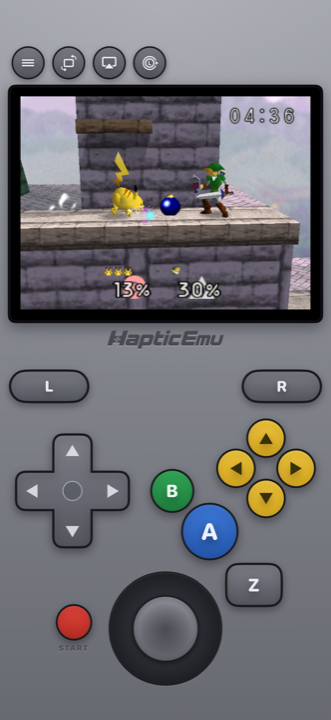
The Nintendo 64 shipped a controller with a slot in the back, and for a lot of people the best thing that ever went in it was the Rumble Pak. A good N64 emulator for Android can bring that back, because every Android phone already has a vibration motor in it. Haptic Emulator wires the two together: when a game rumbles, your phone does.
That is one part of getting N64 right on a phone. The other is that strange three-pronged controller, and that part decides whether the games are fun or frustrating.
Rumble Pak games that actually rumble
In 1997 a lot of N64 games were built to shake the controller: when you took a hit, fired a shot, landed a jump, or crashed a kart. Most emulators just drop that, so you play those games silently.
Haptic plugs a virtual Rumble Pak into the controller by default. When a game sends a rumble, it is passed through to your phone's vibration motor, so you feel it in your hands the way you did then. The feel depends on the phone: phones with better vibration motors give a crisper, more controlled buzz, and cheaper motors a softer one.
It is separate from the button haptics, too. Every on-screen press also answers back with a short tap, and the in-game menu lets you switch button haptics, control haptics and rumble on or off independently. Keep the rumble and lose the button taps, or the reverse.
The Controller Pak, handled
The other thing that went in that slot was the Controller Pak, a little memory card. Most N64 games never needed it, because they save straight to the cartridge, and those saves just work in Haptic with nothing to set up.
A few games saved to the Controller Pak instead. For those, open the in-game menu and switch that game's pak from Rumble Pak to Controller Pak. It is the same trade the real hardware forced: a controller holds one pak at a time, so that game loses rumble while the Controller Pak is in. Changing the pak restarts the game, and the choice is remembered per game, so everything else keeps its rumble. There is also an empty-slot option for the rare game that misbehaves with any pak in.
A real N64 layout: stick and C-buttons
The N64 controller had a stick nobody had seen before, a trigger underneath, and four yellow C-buttons. A lot of emulators fold those C-buttons into a second thumbstick, which falls apart the moment a game uses them as buttons: as your weapons, your camera, your item slots.
- Four separate C-buttons. Haptic's portrait N64 pad keeps them as four yellow buttons in their original cluster, beside green B, blue A and the Z trigger.
- A stick you can tune. Move it and resize it in the layout editor, and set its sensitivity, which is worth thirty seconds in any 3D platformer.
- Full-screen landscape. Turn the phone and the picture fills the screen with floating controls around it.
- A real controller. PlayStation and Xbox controllers and other Bluetooth or USB gamepads connect. The left stick is the N64 stick and the right stick works the C-buttons, with remapping per player.
- Up to four players. The N64 had four controller ports, and Haptic takes up to four gamepads on one phone.
Getting started on Android
Already have your N64 cartridge backups on the phone, or in a cloud drive?
- Install Haptic Emulator from Google Play. A normal install. No APK file, no "unknown sources".
- Import your games. Use Android's file picker, or share a file into Haptic from Files, your browser's downloads or a cloud drive app. .z64, .n64 and .v64 all open, and zip, 7z and RAR archives are unpacked for you.
- Let the box art land. Covers download automatically and each game files itself on the Nintendo 64 shelf.
- Press start. No BIOS needed. The N64 pad and the Rumble Pak are already in place.
Put it on the TV
The N64 was a living-room console, and a four-player one. With Haptic Pro, Play on TV sends the game to a television, either over a USB-C to HDMI cable or by casting the screen from Android's Quick Settings, and your phone becomes the controller. Add gamepads for the other players.
Which phones run it well
Haptic needs Android 9 or later on a 64-bit ARM phone, which covers practically every phone sold since around 2019. The N64 sits in the middle of the range: most of the library runs at full speed on mid-range phones, whatever chip they use, while a handful of demanding games want more headroom and run best on newer phones.
Underneath, Haptic runs N64 on the open-source Mupen64Plus-Next core, with the on-screen pad mapped to it. On phones with GPU headroom you can also raise the internal resolution to 2x or 3x from the in-game menu.
Before you switch phones, export your saves from Haptic (free) or use its full backup (Pro). Haptic's app data is left out of Google's automatic phone backup, and your game files and saves are never uploaded anywhere.
Other N64 emulators on Android
As of November 2026 (store details drift, so check the listings):
- M64Plus FZ. The long-running dedicated N64 app, free with ads on Google Play. It exposes a lot of plugin and video settings to experiment with. Its Play listing was last updated in April 2024.
- RetroArch. Free and open-source. It runs N64 through libretro cores, including Mupen64Plus-Next, if you're happy to set it up yourself.
- Lemuroid. A free, open-source libretro app that covers N64 along with a couple of dozen other systems, with a simple library.
All three are reasonable ways to play. Haptic's pitch is the finish: a console-specific N64 pad, rumble through the phone, box-art shelves, and the same treatment for 25 other systems in one app.
For the curious (optional)
Skip this if you just want to play.
The N64's processor runs MIPS code, which your phone can't run directly. The fast way to emulate it is a dynamic recompiler, a JIT, which translates blocks of that code into your phone's own ARM code as the game runs. Android allows apps to do this. iPhone apps aren't allowed to, which is why the iPhone version of Haptic runs N64 through an interpreter instead. On Android, Mupen64Plus-Next runs with its dynamic recompiler on.
One tip that holds everywhere: don't chase maximum sharpness. The N64 blurred its own textures on purpose and was made for CRT televisions that softened them again, so a razor-sharp picture can expose seams the original hid. A light CRT filter (Pro) often looks more like the console you remember.
Frequently asked questions
Does the Rumble Pak work in an N64 emulator on Android?
What about games that save to the Controller Pak?
Will N64 games run on my Android phone?
Can I play N64 on Android with a controller, or with friends?
Which N64 file types does Haptic open?
Does Haptic Emulator come with games?
Your whole childhood. One download.
Haptic Emulator runs 26 retro systems on Android phones, tablets and foldables — free to play, and it ships no games: it plays the ones you already have.


Free on Google Play · Android 9 and later · 26 systems