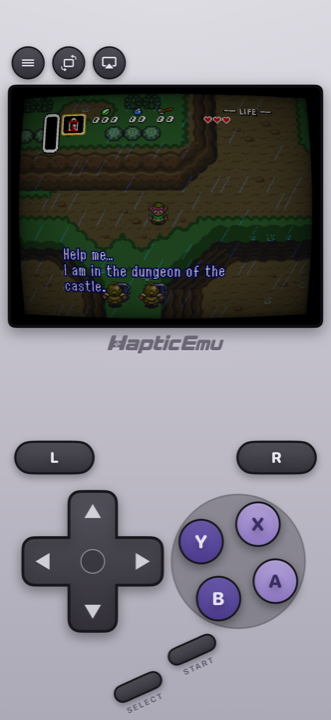
The Super Nintendo is where 2D games peaked. Sixteen-bit art got good enough that the limits stopped showing, and the result was a library that has aged better than almost anything since.
It's also very easy to carry around now, because your phone runs it without breaking a sweat.
Getting started: the 30-second part
Already have the ROM on your phone? Then this takes no time.
- Get Haptic Emulator from the App Store. Free, ordinary install, nothing that expires after a week.
- Tap import. From Files, a folder, or the clipboard — zipped files work as they are.
- Let the box art appear. Covers download on their own and games file themselves on your Super Nintendo shelf.
- Press start. The SNES controls load automatically.
The SNES pad is the ancestor of every controller since — D-pad, four buttons in a diamond, two shoulders — so it's the most comfortable system on this whole list to play with your thumbs. Every button can still be dragged somewhere else, and each press answers back through the iPhone's Taptic Engine.
The one setting that really matters
Turn on the old-television filter. Genuinely, before you start anything.
Super Nintendo artists were drawing for tube televisions, and they used that on purpose. Skies, water, shadows and see-through effects were all built expecting the screen to soften and blend things slightly. Your phone doesn't do that — it shows every pixel exactly as it is, which sounds better and often isn't.
Put the filter on and things that looked like a hard checkerboard become the smooth gradient the artist intended. Waterfalls look like water again. It's the single biggest visual difference on this console, and it's one tap.
There's a range to pick from — subtle scanlines through to full curved glass — so try a couple on a game you know well.
Save wherever you want
Plenty of SNES games came from the password era, or gave you a save point every hour if you were lucky. You can snapshot the game at any moment and drop back in exactly there — which quietly makes a lot of famously punishing games finishable.
Other things you can do
- Cheat codes work. The old Game Genie codes still do what they always did, if you fancy revisiting that.
- Two players, one device. Pair two controllers for local multiplayer — this library is full of it.
- Put it on the TV. Send the picture to a television and use the phone as the controller.
- Real controllers connect. PlayStation, Xbox and MFi pads, which is worth it for the fighting games.
For the curious (optional)
Entirely optional — this is just the explanation behind the filter advice above.
The SNES ran at 256×224 pixels with a limited palette, and artists used a trick called dithering constantly: alternating two colours in a fine checkerboard so that a CRT television would blend them into a third colour that the hardware couldn't actually display. Transparency effects worked much the same way, relying on the screen to mix neighbouring pixels.
Modern displays don't blend anything — every pixel is distinct and perfectly sharp. So all that dithering, which was invisible on the intended hardware, turns into a visible grid of dots. The old-television filters restore the blending, which is why they tend to look closer to the original than a clean picture does.
One more small thing: SNES games were shown on 4:3 televisions and a lot of art assumed that slight horizontal stretch. Playing at the wrong shape makes characters look subtly too tall — easy to miss until you notice it, then impossible to unsee.
Frequently asked questions
Do SNES games need a screen filter?
Do I need to jailbreak my iPhone?
Do Game Genie cheat codes still work?
Does Haptic Emulator come with games?
Can two people play together?
Your whole childhood. One download.
Haptic Emulator runs 21 retro systems on iPhone and iPad — free to play, and it ships no games: it plays the ones you already have.

Free to play · all 21 systems · iPhone & iPad