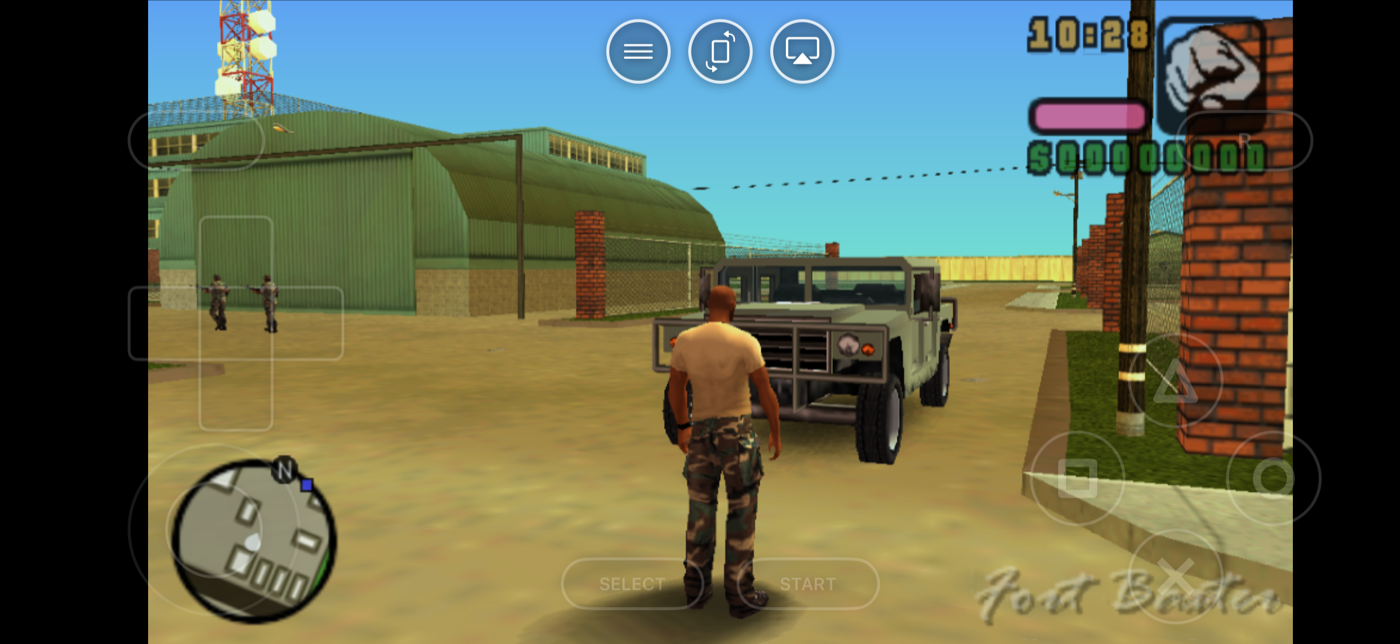
Look up a PSP emulator for Android and every answer starts with the same name: PPSSPP. It has been the PSP emulator for more than a decade, it's free on Google Play, and it is excellent. It is also the engine Haptic Emulator uses for PSP games.
So this isn't a post about replacing PPSSPP. It's about what changes when PPSSPP's emulation sits inside an app built around 26 consoles, and whether that's what you want. If PSP is the only system you will ever play and you enjoy a long settings menu, the honest answer is: install PPSSPP and have fun. If your phone also holds Game Boy, PlayStation and N64 backups, read on.
PPSSPP first, because it earned it
PPSSPP is the open-source project that made PSP emulation on phones ordinary. On Android it's a free download, with a separate paid Gold version that is largely a way to support the project. It has every knob you could ask for: graphics backend, rendering resolution, texture filtering, per-game settings. It supports RetroAchievements, and it has ad hoc multiplayer options for the games that used them.
Haptic's PSP support is built on PPSSPP's core, the open-source libretro build of the same emulator. When a PSP game runs well in Haptic, that is PPSSPP's work, and the credit belongs to the people who did it. What Haptic adds is everything around the emulator.
What Haptic adds around it
- One library, 26 systems. Your PSP games sit on their own shelf of 3D boxes, next to your GBA, PS1 and N64 games. Box art downloads on its own after you import.
- A controller that looks like a PSP. Full-screen landscape with the PSP buttons floating over the picture. Move or resize anything in the layout editor, and set the stick's sensitivity to suit how you play.
- You feel every press. Each button answers through your phone's vibration motor. How crisp that feels depends on the phone; ones with better motors feel sharper. Button, control and rumble feedback can be switched separately in the in-game menu.
- Real controllers. PlayStation and Xbox controllers and other Bluetooth or USB gamepads connect, with per-player remapping.
- The TV, with the phone as the pad. Covered below. It's the feature PSP games were quietly waiting for.
What you give up is depth. Haptic exposes the settings that change how a game feels, not the dozen that change how it benchmarks. If you want the dozen, you already know you want PPSSPP.
PSP emulators on Android, side by side
| PPSSPP | Haptic Emulator | RetroArch | |
|---|---|---|---|
| Systems | PSP only | 26, PSP included | Dozens, via cores |
| PSP emulation | PPSSPP | PPSSPP core | PPSSPP core |
| Price | Free; paid Gold version | Free to play with ads; optional Pro | Free |
| Setup before first game | Point it at your games | Import and play, box art appears on its own | Choose a core, then configure |
| Settings depth | Very deep | The ones you'll use: layout, stick, filters | Very deep, desktop-style menus |
| Achievements | RetroAchievements | No | RetroAchievements |
| Play on a TV | Android casting or HDMI, like any app | Built in (Pro), phone becomes the controller | Android casting or HDMI, like any app |
| Other consoles in the same library | No | Yes, 25 more | Yes, one core per system |
| Ships games or BIOS | No | No | No |
Competitor details are as of November 2026 and will drift. The shape of the comparison won't: same emulator underneath, different app around it.
Which Android phone do you need?
This matters more on Android than on iPhone, because Android phones span a much wider range of chips.
Haptic itself needs Android 9 or later on a 64-bit ARM phone, which is essentially every phone sold since around 2019. Within that, PSP is one of the more demanding systems: the console had real 3D graphics hardware, and its work has to be translated for your phone's graphics chip.
- Mid-range phones from the last few years run most of the PSP library well.
- The heaviest 3D games run best on newer phones, whatever the badge on the chip says: recent Snapdragon, Dimensity, Tensor and Exynos phones all have headroom that older budget phones don't.
- On an older or budget phone, 2D and lighter 3D PSP games are the safe bet, and the 8-bit, 16-bit, GBA and PS1 shelves will run happily.
Long 3D sessions also warm a phone up and use battery faster than a Game Boy game does. That's true of every PSP emulator, PPSSPP included.
Getting started: the two-minute part
Already have your PSP backups on the phone, or in a cloud drive?
- Install Haptic Emulator from Google Play. An ordinary install. No APK to sideload, no "unknown sources" setting to flip.
- Import. Tap import and pick files with Android's file picker, or share a file into Haptic straight from your Files app, a browser download or a cloud drive app. Zip, 7z and RAR archives are unpacked for you. PSP games are large, so give it a moment.
- Let the box art land. Covers download automatically and the game files itself on your PSP shelf.
- Turn the phone sideways. PSP games were made for a wide screen, and full-screen landscape suits them.
The free library holds a handful of games; Haptic Pro lifts that limit and adds batch import for bringing in a whole folder at once.
Play it on your TV
With Haptic Pro, plug the phone into a TV with a USB-C to HDMI cable, or cast the screen from Android's Quick Settings. The game moves to the television and the phone in your hands becomes the controller. A PSP game on a big screen looks far better than you'd expect, and it turns a handheld game into a sofa game.
Three quick tips
Set your stick up early
The PSP's analog nub was awkward even when it was new. Spend thirty seconds in the layout editor sizing and placing the on-screen stick, and adjust its sensitivity. It pays for itself in any game where you aim or drive.
Don't over-filter these
Screen filters (Pro) are a big win on older 2D consoles drawn for tube televisions. PSP games are 3D and modern enough that they mostly look best left clean.
Keep your own backup
Haptic's data is left out of Android's Google backup, so a new phone won't bring your saves along by itself. Export your save data from Haptic now and then; that's free. Haptic Pro adds a full backup of the library.
Worth knowing
Your game files and saves stay on the phone and are never uploaded. Saving in-game works as it did on the PSP; unlimited save states, auto-save and fast-forward come with Haptic Pro. And Haptic ships no games, no ROMs and no BIOS files. PSP doesn't need a BIOS anyway; you bring backups of the discs you own.
For the curious (optional)
The PSP's screen was 480×272 pixels. Almost any Android phone has several times that in each direction, which is why PSP games can be drawn in more detail on a phone than on the handheld, and why they hold up on a TV.
Emulating the PSP means two jobs: running code written for its MIPS processor on your phone's ARM chip, and turning commands meant for its graphics hardware into something a modern phone GPU understands. PPSSPP has spent well over a decade getting both right across thousands of games. Building on that, rather than reinventing it, is the obvious choice for any app that wants PSP to work.
Frequently asked questions
What is the best PSP emulator for Android?
Does Haptic Emulator use PPSSPP?
Which Android phones can run PSP games in Haptic?
Do I need to sideload an APK or allow unknown sources?
Can I play PSP games on my TV from an Android phone?
Do I need a BIOS file for PSP games?
PSP on Android, and 25 more.
Haptic Emulator runs 26 retro systems on Android phones — free to play, and it ships no games: it plays the ones you already have.


Free on Google Play · Android 9 and later · 26 systems