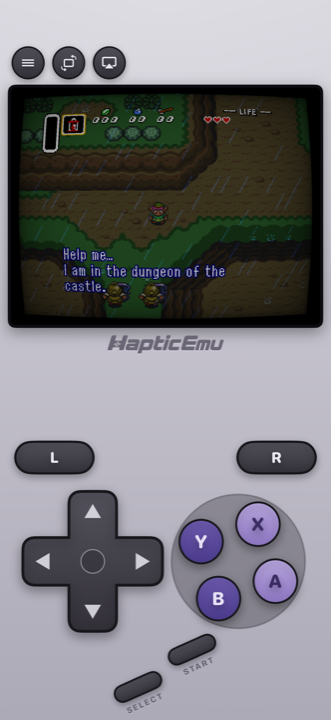
The Super Nintendo is where 2D games peaked, and Android has been playing them for as long as there has been an Android. The hardware is from 1990, and a phone you can buy today has power to spare for nearly all of it.
That long history is also why searching for a SNES emulator for Android is such a mess: APK sites, forum threads from 2012, and lists that still recommend apps Google pulled years ago. Below are the six that are actually on Google Play and maintained in November 2026, what each costs, and who each one suits.
Which SNES emulator for Android?
Five of these six play nearly the whole library well. The difference is mostly price, extras, and whether you want one app or one app per console. The sixth, SUPER ZSNES, is new and worth knowing about, with a couple of caveats below.
| App | Price model | SNES engine | Other systems | Stands out for |
|---|---|---|---|---|
| Haptic Emulator | Free to play with ads; optional Pro | bsnes | 26 in all: Nintendo, Sony, SEGA, Atari, NEC, SNK, arcade, DOS | Accuracy-focused core, SNES-style pad, vibration on every press, box-art shelves, free cheats |
| Snes9x EX+ | Free and open source, without ads | Snes9x | None; sister apps cover other consoles | Rewind, Super Scope and SNES mouse, MSU-1, deep settings |
| SUPER ZSNES | Paid once, no advertising | Its own, not open source | None | Widescreen, high-resolution Mode 7 and new art for a few supported games; rewind. Early access |
| John NESS | Free with ads; pay to remove them | Its own | NES | Fast-forward and slow motion, turbo buttons |
| Lemuroid | Free and open source, without ads | Snes9x | Many, from NES to PSP and DS | Simple, free, cloud save sync |
| RetroArch | Free and open source | Your choice of cores | Dozens, through cores | Netplay, shaders, RetroAchievements, run-ahead |
- Super Nintendo plus a Game Boy, PlayStation, SEGA or arcade game or two? Haptic. One library for all 26 systems, one controller setup, and your game files and saves are never uploaded.
- Only SNES, free, and you want every option there is? Snes9x EX+. It's open source, it's been maintained for over a decade, and it has rewind plus support for the odd accessories: the Super Scope light gun, the SNES mouse, and MSU-1 soundtrack hacks.
- Curious about the new one? SUPER ZSNES comes from two of the original ZSNES developers, rewritten from scratch. Its party trick is an enhancement engine that adds widescreen, sharper Mode 7 and replacement art to a short list of supported games. It's early access, though: the Super FX and DSP-1 chips aren't emulated yet, so Star Fox doesn't run, and games load only from the app's own folder.
- Free and open source, and you play other consoles too? Lemuroid if you want it simple. RetroArch if you'll spend time in settings, or want to play a friend over the internet.
RetroArch is on Google Play in two versions, RetroArch and the 64-bit RetroArch Plus, both updated in October 2026. Neither has the core downloader, so you get the cores that come with the app, and the Play listings don't say which SNES cores those are. The full version from the RetroArch website can download Snes9x, bsnes, bsnes-hd (which has a widescreen mode) and Mesen-S, among others. Other apps' details come from their Google Play listings and project pages as of November 2026; they will drift, so check each listing before you download.
Setting it up on Android
- Install Haptic Emulator from Google Play. It needs Android 9 or later on a 64-bit phone, which is nearly every phone sold since around 2019. No APK, no unknown-sources toggle.
- Put your game files somewhere the phone can see them. Your Downloads folder, an SD card, or a cloud drive app all work. These should be backups of cartridges you own.
- Tap import and pick them in Android's file picker. Or skip the menu entirely: in Files or your cloud drive app, share a game file to Haptic. .sfc and .smc files work, and zips, 7z and RAR archives are unpacked for you.
- Let the box art land, then press start. Covers download on their own, and every game files itself on the Super Nintendo shelf.
The free library holds a handful of games at a time. Haptic Pro makes room for a bigger collection and adds batch import, so you can bring in a whole folder at once.
Will it run on my phone?
Almost certainly. Haptic runs the SNES on bsnes, which favours accuracy and asks more of the chip than Snes9x does. A recent or mid-range phone has room to spare. On an older budget phone, try one of the Super FX games first, such as Star Fox or Yoshi's Island: that chip makes them the heaviest in the library, so if they run smoothly, everything else will.
The controller everything copied
The SNES pad is the ancestor of nearly every controller since: a d-pad, four face buttons in a diamond, and two shoulder buttons. Haptic's on-screen version keeps the details, down to the diamond's tilt and its two shades of purple, and every press answers with a short tap from your phone's vibration motor. How crisp it feels depends on the phone, and you can switch haptics off per type in the in-game menu.
- Portrait gives you the console-style pad with the screen above it, and the shoulder buttons above the d-pad and face buttons.
- Landscape goes full screen with floating controls you can drag where your thumbs land, and adjust in the layout editor.
- A controller is worth it for the fighting games and platformers. PlayStation and Xbox controllers and other Bluetooth or USB gamepads connect through Android, every button can be remapped, and a second pad takes player two's seat for the co-op and versus classics.
Save wherever you want
Plenty of SNES games came from the password era, or gave you a save point every hour if you were lucky. Save states, unlimited with Haptic Pro, let you snapshot the game anywhere and drop back in right there. Free players can earn a save slot by watching a short ad, and loading a state is always free. Games with a battery save on the cartridge save in the game itself as they always did.
Game Genie codes work too, free on every tier: enter the code from the cheats menu and it applies as the game runs.
Making it look right
This is the console where a screen filter matters most. SNES artists drew for tube televisions and leaned on them: skies, water and see-through effects were dithered, alternating two colours in a fine checkerboard that a CRT blended into a third. A sharp phone screen shows that checkerboard as it is. Haptic Pro's screen filters include CRT, scanlines, VHS and aperture-grille looks, and with one on, waterfalls look like water again. Fast-forward, for the slow bits, is a Pro feature too.
Keeping your saves safe on Android
Haptic's data is excluded from Android's Google backup. Your game files and saves are never uploaded anywhere, which also means a new phone won't bring them across by itself. Export your save data from Haptic, which is free, or make a full backup with Haptic Pro, and keep the file in your cloud drive or on a computer before you factory-reset or switch phones.
What Haptic doesn't do
Haptic has no rewind, no online netplay and no RetroAchievements on Android, and it doesn't do widescreen or high-resolution Mode 7. If rewind is how you play, Snes9x EX+ has it; for internet play or achievements, RetroArch does both; and for widescreen, SUPER ZSNES covers its supported games and RetroArch's bsnes-hd core tries for the rest. Everything else you'd do on a real Super Nintendo, alone or with a second controller, works.
The NES and Game Boy sit on their own shelves in the same app, with their own skins and button layouts. Our NES emulator guide for Android covers the console before this one, and the best emulator for Android compares the all-in-ones across every system.
For the curious (optional)
Haptic's SNES emulation is bsnes, a long-running, accuracy-first open-source SNES emulator. Most free SNES apps on Android use Snes9x instead, which is fast and very good but carries a licence that doesn't allow commercial use. That's the reason Haptic ships bsnes alone, and it's why the accuracy-focused core is the one you get.
The console drew 256×224 pixels, but those pixels weren't square: games were designed to be seen stretched to a 4:3 television, and that's the shape Haptic shows them in. Mode 7, the trick behind the spinning, scaling floors of racing games and world maps, was one background layer the hardware could rotate and scale, which is why widescreen and high-resolution versions of it are an enhancement rather than how the games originally looked.
Frequently asked questions
What is the best SNES emulator for Android?
Is there an official Nintendo SNES app for Android?
What happened to SNesoid and SuperGNES?
What is SUPER ZSNES?
Do Game Genie codes work?
Can two people play SNES games on one Android phone?
Does Haptic Emulator come with games?
Sixteen bits, every classic.
Haptic Emulator plays 26 retro systems on Android phones and tablets — NES to GameCube, free to play, and it ships no games: it plays the ones you already have.


Free on Google Play · Android 9 and later · 26 systems