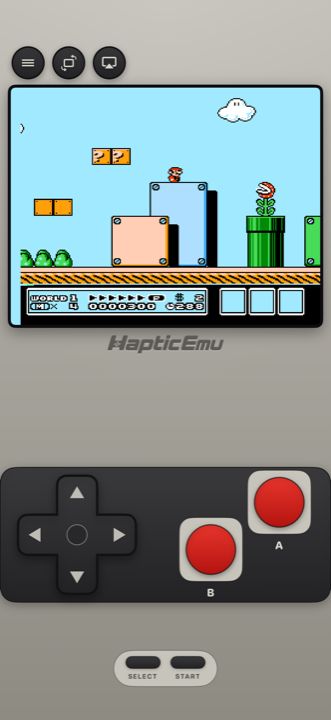
The NES is the easiest console there is to emulate on Android. The hardware is from 1983, the controller had a d-pad and two buttons, and a budget phone has thousands of times the power the games need. NES emulators were on Android before most people had heard of the Play Store.
That's also the problem. Search for an NES emulator for Android and you get APK sites, forum threads from 2012 and apps that vanished years ago. Below are the six that are actually on Google Play and maintained in November 2026, what each costs, and who each one suits.
Which NES emulator for Android?
Every one of these plays the games themselves well. NES emulation has been solved for a long time, so the difference is price, extras, and whether you want one app or one app per console.
| App | Price model | NES engine | Other systems | Stands out for |
|---|---|---|---|---|
| Haptic Emulator | Free to play with ads; optional Pro | Nestopia UE | 26 in all: Nintendo, Sony, SEGA, Atari, NEC, SNK, arcade, DOS | Console-style pad, vibration on every press, box-art shelves, free cheats |
| NES.emu | Paid once, no advertising | FCEUX | None; sister apps cover other consoles | Famicom Disk System, Zapper, .cht cheat files, deep settings |
| NostalgiaNes | Free Lite with ads; paid Pro | FCEUX | None | Rewind, turbo buttons, other phones as Wi-Fi controllers |
| John NESS | Free with ads; pay to remove them | Its own | Super Nintendo | Fast-forward and slow motion from 0.25× to 16× |
| Lemuroid | Free and open source, without ads | FCEUmm | Many, from NES to PSP and DS | Simple, free, cloud save sync |
| RetroArch | Free and open source | Your choice: Mesen, Nestopia UE, FCEUmm, QuickNES | Dozens, through cores | Accuracy with Mesen, run-ahead, netplay, shaders |
- NES plus a Game Boy, PlayStation, SEGA or arcade game or two? Haptic. One library for all 26 systems, one controller setup, and your game files and saves are never uploaded.
- Only NES, and you want every option there is? NES.emu. It's paid, but it's a one-time purchase, it plays Famicom Disk System games (with the Disk System BIOS, which you supply) and it's open source.
- Only NES, free, and you like rewind? NostalgiaNes Lite. In the free version, saving and rewind depend on an ad loading, so they need a connection; the paid Pro removes the ads.
- Free and open source, and you play other consoles too? Lemuroid if you want it simple. RetroArch if you'll spend time in settings: pick the Mesen core and turn on run-ahead, and it's as close to an original console as NES emulation gets.
RetroArch is on Google Play in two versions, RetroArch and the 64-bit RetroArch Plus, both updated in October 2026. Neither has the core downloader, though, so the cores you get come with the app; the full version with the downloader is on the RetroArch website. Other apps' details come from their Google Play listings and project pages as of November 2026; they will drift, so check each listing before you download.
Setting it up on Android
- Install Haptic Emulator from Google Play. It needs Android 9 or later on a 64-bit phone, which is nearly every phone sold since around 2019. No APK, no unknown-sources toggle.
- Put your game files somewhere the phone can see them. Your Downloads folder, an SD card, or a cloud drive app all work. These should be backups of cartridges you own.
- Tap import and pick them in Android's file picker. Or skip the menu entirely: in Files or your cloud drive app, share a game file to Haptic. Zips, 7z and RAR archives are unpacked for you.
- Let the box art land, then press start. Covers download on their own, and every game files itself on the NES shelf.
The free library holds a handful of games at a time. Haptic Pro makes room for a bigger collection and adds batch import, so you can bring in a whole folder at once.
Will it run on my phone?
Yes, whatever the phone. On Android, the chip matters a lot for GameCube and 3DS, which want a recent mid-range or flagship. The NES is at the other end: a budget phone, a tablet, a foldable or a phone you retired five years ago all run it at full speed. If the phone can install Haptic, it can play NES games.
Two buttons, plenty of room
Because the NES needs so little, the on-screen layout can be generous: a d-pad big enough to actually hit, and the two red buttons far enough apart that you won't catch the wrong one mid-jump. Every press answers with a short tap from your phone's vibration motor, which matters more than you'd expect in games this precise. How crisp it feels depends on the phone, and you can switch haptics off per type in the in-game menu.
- Portrait gives you the console-style pad with the screen above it.
- Landscape goes full screen with floating controls you can drag where your thumbs land, and adjust in the layout editor.
- A controller is where NES games really come back to life, since this is the console where a physical d-pad is missed most. PlayStation and Xbox controllers and other Bluetooth or USB gamepads connect through Android, every button can be remapped, and a second pad takes player two's seat for the co-op classics.
This is the big one for NES games
NES games were brutally hard, and most had no save at all: you finished in one sitting or you started over. Save states, unlimited with Haptic Pro, let you snapshot the game anywhere, which quietly turns a lot of "impossible" childhood games into ones you can finish. Free players can earn a save slot by watching a short ad, and loading a state is always free.
Game Genie codes work too, free on every tier: enter the six- or eight-letter code from the cheats menu and it applies as the game runs.
Making it look right
NES games were drawn for tube televisions, and their big, chunky pixels take a CRT or scanline filter well. Haptic Pro's screen filters include CRT, scanlines, VHS and aperture-grille looks, and a sharp mode if you want clean pixels with smooth edges. Try a couple and keep whichever looks like your childhood. Fast-forward, for the slow bits, is a Pro feature too.
One thing that isn't a bug: if sprites flicker when the screen gets busy, that's the real console showing through. The NES could only draw so much per line, and games deliberately flickered things to cope. It did that in 1988 too.
Keeping your saves safe on Android
Haptic's data is excluded from Android's Google backup. Your game files and saves are never uploaded anywhere, which also means a new phone won't bring them across by itself. Export your save data from Haptic, which is free, or make a full backup with Haptic Pro, and keep the file in your cloud drive or on a computer before you factory-reset or switch phones.
What Haptic doesn't do
Haptic has no rewind, no online netplay and no RetroAchievements on Android. If rewind is how you play, NostalgiaNes has it; if you want to play a friend over the internet or chase achievements, RetroArch does both. Everything else you'd do on a real NES, alone or with a second controller, works.
The Super Nintendo and Game Boy sit on their own shelves in the same app, with their own skins and button layouts. Our SNES emulator guide for Android and Game Boy guide for Android cover those, and the best emulator for Android compares the all-in-ones across every system.
For the curious (optional)
Haptic's NES emulation is Nestopia UE, a long-running open-source NES emulator known for accuracy. It is one of the same cores RetroArch offers, so on accuracy the two meet; what separates them is everything around the core.
The NES output 256×240 pixels from a famously limited palette, and every television interpreted its signal slightly differently, which is genuinely why people remember the same games in different colours. The flicker has a specific cause too: the console could draw only eight sprites on any one horizontal line, so when more lined up, games alternated which were drawn each frame. Reproducing that is correct behaviour, not a fault.
Frequently asked questions
What is the best NES emulator for Android?
Is there an official Nintendo NES app for Android?
What happened to Nesoid?
Do Game Genie codes work?
Can two people play NES games on one Android phone?
Does Haptic Emulator come with games?
Two buttons, every classic.
Haptic Emulator plays 26 retro systems on Android phones and tablets — NES to GameCube, free to play, and it ships no games: it plays the ones you already have.


Free on Google Play · Android 9 and later · 26 systems