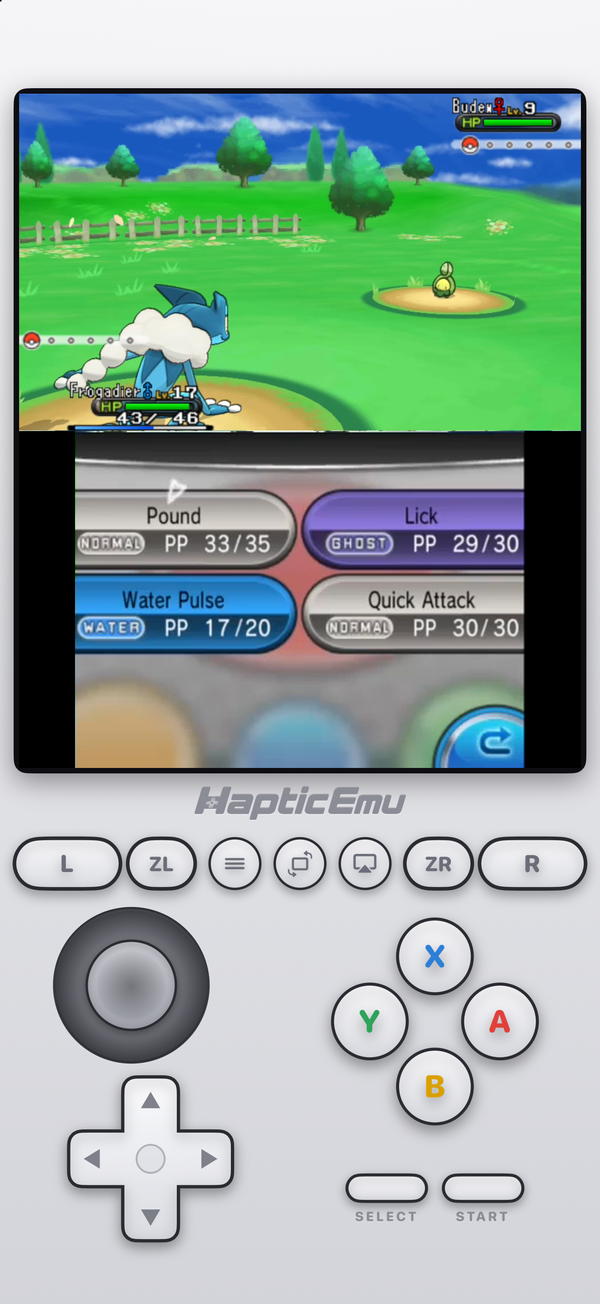
The 3DS years were some of the best for Pokémon: the jump to full 3D in X and Y, the Hoenn remakes, and Alola's island trials in Sun and Moon. None of them has been re-released on the Switch. If you still have the cartridges, your iPhone is now a good way to play them again.
The 3DS Pokémon games
- Pokémon X and Y (2013). Kalos, Mega Evolution, and the first fully 3D main-series games.
- Omega Ruby and Alpha Sapphire (2014). The Hoenn remakes, with the same engine as X and Y.
- Sun and Moon (2016) and Ultra Sun and Ultra Moon (2017). Alola, Z-Moves, and noticeably heavier graphics.
All of them are 3DS games, so on an iPhone you need a 3DS emulator. Haptic Emulator added the 3DS in version 1.0.13.
Getting set up
- Get Haptic Emulator from the App Store. Free, no jailbreak, nothing to enable.
- Import a decrypted backup of your cartridge — a
.3dsor.ccifile. Haptic checks at import and tells you if a file is still encrypted, which is the most common reason a game won't start. You don't need keys or system files. - Press play. The top screen is the overworld or the battle; the lower one is a touchscreen.
More detail on file types and settings is in our 3DS on iPhone guide.
Why the touch screen matters here
These games lean on the lower screen far more than older Pokémon did. In battle, your four moves are there as big buttons. In X and Y, the Player Search System and Pokémon-Amie live there; in Sun and Moon, the Rotom Dex map does. In Haptic, the lower screen sits right under the top one and responds to your finger directly, so picking a move is one tap rather than a cursor walk.
Which ones run best
An honest note, because it varies. App Store emulators run 3DS games without JIT, and that costs speed. How much you notice depends on the game and the phone.
- X and Y, and Omega Ruby and Alpha Sapphire are the lighter pair. Walking around, menus and most battles are where a recent iPhone handles them comfortably.
- Sun, Moon and the Ultra versions are the heaviest. They slowed down in double battles even on the original 3DS, and they're the ones where a newer iPhone, or a lower resolution setting, makes the most difference.
The first time a big move animation plays, it can be missing for a frame or two while the phone prepares it. After that it's kept, and it plays cleanly.
What you can't do
- Trade or battle online. Nintendo ended 3DS online services in April 2024. That affects everyone, emulator or not.
- Trade locally. That needed two consoles side by side. Trade evolutions — Haunter, Kadabra, Machoke, Graveler — are out of reach on a single device.
- Use the 3D effect, which needed the 3DS screen. X and Y only used it in battles and a few scenes anyway.
- Use cheats. Haptic doesn't offer cheat codes for 3DS yet.
Coming from the GBA games?
If you've been replaying Emerald or FireRed in Haptic, the 3DS games sit on their own shelf in the same app, with the same controls and the same import. Omega Ruby after Emerald is a particularly good pairing: the same region, a decade apart.
The older generations are in our Pokémon on iPhone guide, which lists every handheld Pokémon game from Red and Blue onwards and the console each one needs.
For the curious (optional)
X and Y were the first main-series games built for full 3D, and Game Freak used the 3DS's stereoscopic effect only in battles and a few scenes, partly because it slowed the game down. Sun and Moon dropped stereoscopic 3D almost entirely for the same reason. Both facts are a decent guide to emulation today: the scenes that stressed the original hardware are the ones that stress a phone.
Frequently asked questions
Can I play Pokémon X and Y on my iPhone?
Which 3DS Pokémon games run best on an iPhone?
Can I trade or battle online?
Can I evolve trade-evolution Pokémon like Haunter or Kadabra?
Are the 3DS Pokémon games on Nintendo Switch?
Does Haptic Emulator come with Pokémon games?
Every generation you played. One app.
Haptic Emulator runs 26 retro systems on iPhone and iPad — Game Boy to 3DS, free to play, and it ships no games: it plays the ones you already have.

Free to play · all 26 systems · iPhone & iPad